
Brand impersonation — not the real site
Domain was registered only 6 days ago — brand-new sites are higher-risk by default. This page is styled as a brand but is not the brand's real site. Go to the official site directly, and treat any download, login, or payment request here as unsafe.
Is dmca-chrome-extensions.click legit or a scam?
Phishing page impersonating Google Chrome Web Store DMCA notices on a 6-day-old domain to harvest developer logins.
These checks passed — but they don't clear the site. A clean antivirus result, valid SSL, and a calm server only mean it isn't hosting malware; they say nothing about whether the business is real. This verdict is based on the site's conduct and content, not a malware detection.
Analysis Summary
AI Security Analysis
The site presents itself as an official Chrome Web Store copyright notice but runs on a brand-new domain that is not owned by Google. It uses urgency tactics like a countdown timer and asks visitors to verify their extension ID before pushing for personal details. Two independent security reports from June 2026 explicitly name this exact domain as part of a phishing campaign targeting extension developers. Our antivirus partners flagged the page for phishing, and the domain shows clear clone indicators matching chrome.google.com. The combination of extreme newness, impersonation, and confirmed reports leaves no doubt about its intent.
Website Preview
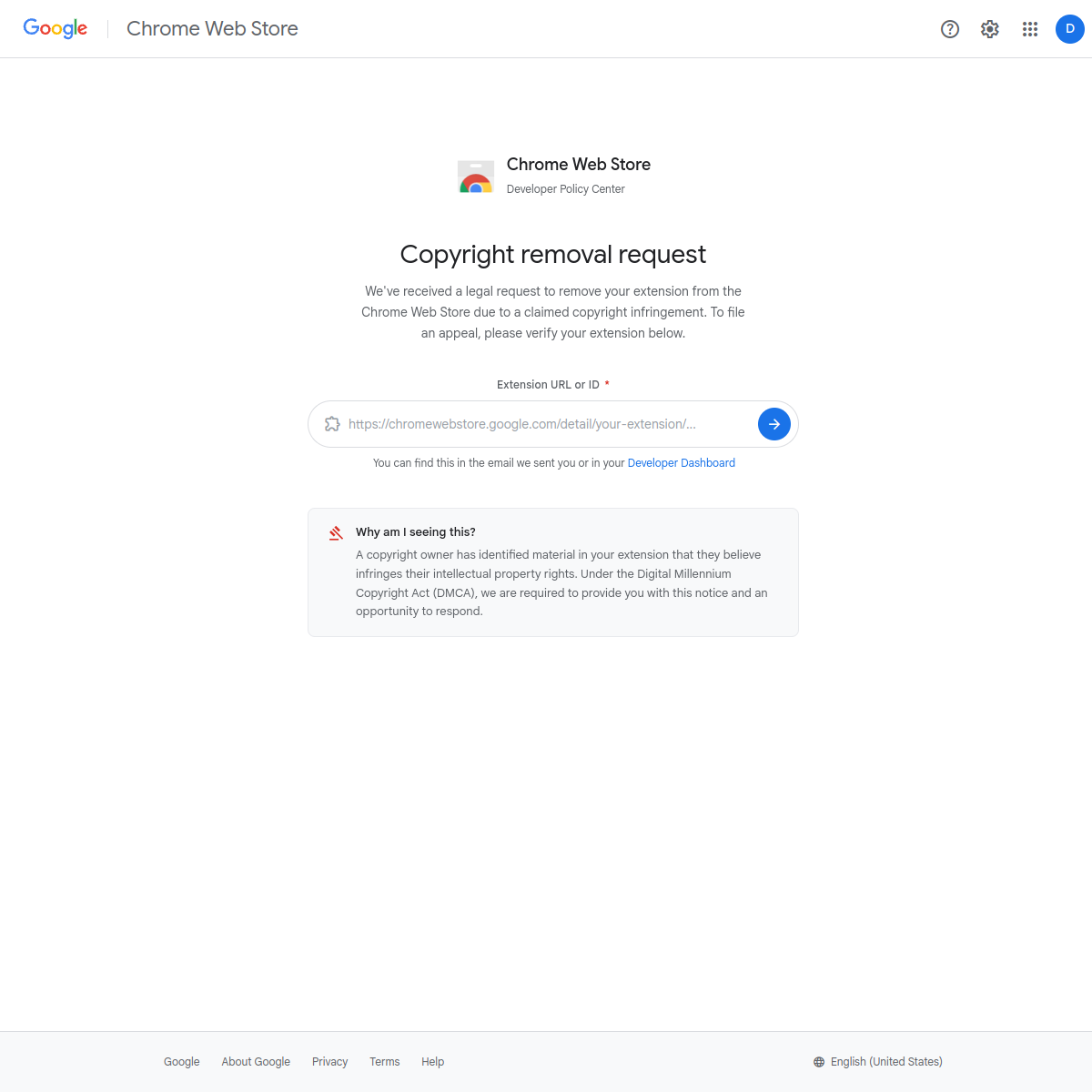
Automated page render — captured in a safe sandbox. What an ordinary visitor would see when loading the site. See full visual analysis →
Web Research Findings
Our live research agent queries scam-report databases, consumer-review sites, news coverage, and general web search for dmca-chrome-extensions.click, then cross-checks business-registration records and look-alike domain patterns. Everything below is pulled from what it actually found.
- Domain dmca-chrome-extensions.click explicitly named in June 2026 Malwarebytes and GBHackers reports as hosting a phishing site.
- Page uses Google branding and title “Copyright Removal Request – Chrome Web Store Developer Policy Center” but is hosted on a non-Google domain.
- Targets Chrome extension developers by prompting for extension ID then fake Google login to steal credentials.
- Domain is 6 days old; no prior mentions or legitimate business presence found.
- No positive reviews, business registrations, or official associations with Google or Chrome Web Store identified.
- Security articles describe it as part of a campaign using real extension metadata pulled from the public Chrome Web Store to create fake takedown notices.
- Malwarebytesopen
"In the version we analyzed, the site used the address `dmca-chrome-extensions[.]click` . Despite that, it uses Google’s branding and presents itself as a “Chrome Web Store Developer Policy Center.”"
- GBHackersopen
"domains like dmca-chrome-extensions[.]click. Once on the phishing page, developers are prompted to enter their extension ID or listing URL to “verify”"
Impersonates official Chrome Web Store Developer Policy Center DMCA/copyright notice pages using Google branding.
Malwarebytes and GBHackers both published reports in June 2026 identifying dmca-chrome-extensions.click as a phishing site that impersonates Google copyright notices to steal Chrome Web Store developer credentials. No positive reviews, business registrations, or legitimate mentions were found.
Scam Network Intelligence
Antivirus Engines
Security Scans
Checked against the major public blocklists used by browsers and security tools — no hits.
Contact Verification
We fetched the page and looked for real-world contact details. Legitimate businesses almost always publish an email on their own domain, a phone number, and a postal address. Scam shops usually don't.
- No contact email found anywhere on the page.
- No phone number listed on the page.
- Page contains phishing language (account verification, suspension warnings, etc.).
- Countdown timer or 'limited time' urgency pressure detected.
- Page impersonates Google on a non-official domain.
- Scam family match: Phishing Patterns.
- Scam family match: Countdown / Urgency.
- Postal address visible on the page.
Domain & Encryption
Redirect Chain
- 1301http://dmca-chrome-extensions.click/
- 2200https://dmca-chrome-extensions.click/
Server Reputation
Scam-Type Likelihood
2 scam-type patterns detected
0 of 13 categories showed signals
We check every URL against 13 distinct scam categories so the verdict tells you not just how risky the page is, but what kind of risk it carries. Each meter pulls from page signals, web reports, our AI analyst, vision, and the scam-network cluster — not from raw AV labels.
- Page claims to be Google.
- Clustered with known brand-impersonation infrastructure.
- Phishing copy patterns in the scraped page.
- Primary scraped category is phishing / credential-harvest.
- AI analyst tagged this as phishing.
0 of 13 categories showed signals
We check every URL against 13 distinct scam categories so the verdict tells you not just how risky the page is, but what kind of risk it carries. Each meter pulls from page signals, web reports, our AI analyst, vision, and the scam-network cluster — not from raw AV labels.
- Page claims to be Google.
- Clustered with known brand-impersonation infrastructure.
- Phishing copy patterns in the scraped page.
- Primary scraped category is phishing / credential-harvest.
- AI analyst tagged this as phishing.
Brand impersonation detected
This page is styled as a known brand but is not the brand's real site.
- Do not interact with dmca-chrome-extensions.click
Do not enter credentials, deposit money, download files, or install browser extensions from this site.
- Go to the brand's real site directly
Type the brand name into a search engine or open it from your bookmarks — don't use links from emails, SMS, ads, or social posts, which are the delivery vectors for impersonation.
- Never download or sign in here
Even if the page "just" offers a download or a giveaway, impersonation pages frequently deliver malware or set up follow-up phishing. Assume anything accepted from this site is hostile.
- OpenReport the impersonation to the brand
Most major brands have a dedicated abuse or anti-phishing reporting channel — reporting helps them take the site down and protects other users.
Reputation Sources
How this domain rates across independent threat-intelligence and blocklist providers.
Referenced Domains
Outbound domains this page links to or loads resources from. Each links to its own security scan.
Safety FAQ
Common questions about this site, answered from the scan data on this page. These are auto-generated — not hand-written — so they always match the underlying report.
- Our automated security review flags dmca-chrome-extensions.click as dangerous. Multiple threat indicators were detected — treat the site as a scam until proven otherwise.
- No — dmca-chrome-extensions.click scored 1/100 on our trust scale. We detected active threat indicators, so we recommend avoiding the site entirely.
- Yes. dmca-chrome-extensions.click presents a valid TLSv1.3 certificate issued by Let's Encrypt · YE1, expiring in 85 days. Note that SSL only encrypts the connection — it does not guarantee that the site itself is trustworthy.
- dmca-chrome-extensions.click is 6 days old, registered on 5/28/2026 through Dynadot, LLC. Scam domains are often freshly registered — a site under 6 months old warrants extra caution.
- 2 out of 92 antivirus engines in our malware network flagged dmca-chrome-extensions.click as malicious or suspicious (2 outright malicious). Even one detection is a meaningful signal.
- No. dmca-chrome-extensions.click is not currently listed on the major browser blocklist feeds that modern browsers use.
- dmca-chrome-extensions.click resolves to an IP operated by Cloudflare, Inc. in US (usage type: Content Delivery Network). Hosting location alone doesn't make a site good or bad, but unusual geography for a brand's claimed country is one of many signals we weigh.
- We cache results for 24 hours. Signed-in MalwareTips members can trigger a manual rescan at any time using the "Rescan" button on the report page, which re-runs every check from scratch and refreshes this page.
User reviews & comments(0)
Share your experience — "Lost $200 on a fake checkout" is more useful than "Scam". Your review helps others avoid traps.