
Phishing site — do not log in
DocuSign phishing page on heliumcompliance.info pushes malware under the guise of document signing.
Is heliumcompliance.info legit or a scam?
DocuSign phishing page on heliumcompliance.info pushes malware under the guise of document signing.
This is a phishing page impersonating DocuSign to trick users into downloading malware. The domain is flagged in OpenPhish threat feeds and uses DocuSign branding to distribute malicious executables.
Score breakdown
 See the live page ↓
These checks passed — but they don't clear the site. A clean antivirus result, valid SSL, and a calm server only mean it isn't hosting malware; they say nothing about whether the business is real. This verdict is based on the site's conduct and content, not a malware detection.
Analysis Summary
Website Preview
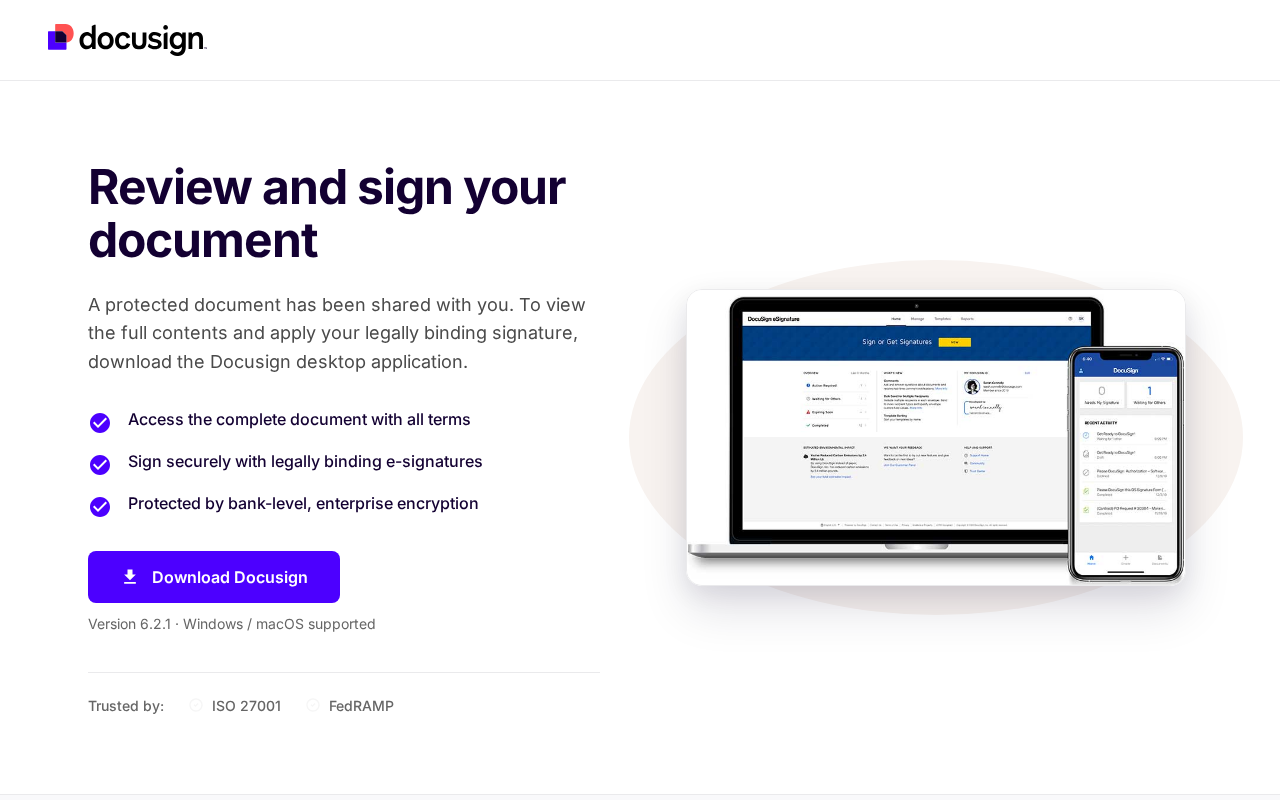
Automated page render — captured in a safe sandbox. What an ordinary visitor would see when loading the site. Marker positions are approximate. See full visual analysis →
Visual analysis
We capture a fresh screenshot of the live page and ask a vision model to look for scam visual patterns — fake trust badges, countdown timers, overlay pop-ups, and visual clones of legitimate brands.
Visual red flags detected in the screenshot
This page impersonates DocuSign to trick users into downloading a malicious file under the guise of viewing a document, which is a common tactic for malware distribution.
What our vision model saw
4 signalsPrompts user to download a desktop application to view a document instead of using standard web-based e-signature workflows
Uses DocuSign branding to distribute potentially malicious executable files
Unusual request for software installation for a simple document review task
High-pressure tactic disguised as a legitimate document signing notification
Intelligence
The page title and content directly impersonate DocuSign, prompting users to download a desktop application instead of using standard web-based signing. Visual analysis confirms the site uses DocuSign branding to distribute potentially malicious files. The domain heliumcompliance.info appears in OpenPhish threat intelligence feeds as a known phishing URL. One antivirus engine flagged the page as spam, and the domain is registered through NiceNIC, a registrar frequently linked to phishing infrastructure. The combination of impersonation, malware distribution, and threat feed listings establishes clear malicious intent.
Web Research Findings
Independent findings for heliumcompliance.info, including public complaints, named review sources, registration records, and look-alike-domain evidence. A missing result is shown as unverified, never converted into a clean bill of health.
- The domain heliumcompliance.info is actively flagged as a phishing site in multiple threat intelligence databases, including OpenPhish.
- The site impersonates DocuSign by using the page title 'Docusign - Download to Review & Sign Document' to deceive users.
- Infrastructure analysis indicates the domain is associated with malicious activity and credential harvesting campaigns.
- The domain is registered through NiceNIC, a registrar frequently associated with CIS-region scam operators and phishing infrastructure.
- Security vendors have flagged the domain as malicious, and it is actively blocked by various threat protection services.
- PhishDestroyopen
"The domain heliumcompliance.info is listed as a phishing URL in the OpenPhish threat feed."
The site uses the page title 'Docusign - Download to Review & Sign Document' to impersonate the legitimate DocuSign service for credential harvesting.
The domain heliumcompliance.info is listed as a phishing URL in the OpenPhish threat feed according to PhishDestroy. The site impersonates DocuSign by using the page title 'Docusign - Download to Review & Sign Document' to deceive users into downloading malicious files. Infrastructure analysis indicates the domain is associated with malicious activity and credential harvesting campaigns. The domain is registered through NiceNIC, a registrar frequently associated with CIS-region scam operators and phishing infrastructure.
Threat Detection
Scam Network
Antivirus Engines
Security Scans
Checked against the major public blocklists used by browsers and security tools — no hits.
Reputation Sources
How this domain rates across independent threat-intelligence and blocklist providers.
Scam-Type Likelihood
2 scam-type patterns detected
2 of 21 categories showed signals
Each card names a specific harm pattern and the concrete facts that support it. The category score is supporting context; the report verdict above remains the final severity decision.
- Domain is a typosquat of docusign.com.
- The evidence pattern matches phishing / data-harvesting.
- Domain is a typosquat of docusign.com.
- The evidence pattern matches brand / clone-site impersonation.
2 of 21 categories showed signals
Each card names a specific harm pattern and the concrete facts that support it. The category score is supporting context; the report verdict above remains the final severity decision.
- Domain is a typosquat of docusign.com.
- The evidence pattern matches phishing / data-harvesting.
- Domain is a typosquat of docusign.com.
- The evidence pattern matches brand / clone-site impersonation.
Technical Details
domain · encryption · redirects · server reputation · referencedThe plumbing behind the site — who registered it, how it’s encrypted, where it’s hosted, and where it links out. A valid certificate or a calm server doesn’t mean the business is honest — scam sites pass these checks too. Use this to corroborate the verdict, not to overturn it.
Contact Verification
We fetched the page and looked for real-world contact details. Legitimate businesses almost always publish an email on their own domain, a phone number, and a postal address. Scam shops usually don't.
- No contact email found anywhere on the page.
- No phone number listed on the page.
- No postal address visible on the page.
Domain & Encryption
Redirect Chain
- 1301http://heliumcompliance.info/
- 2200https://heliumcompliance.info/
Server Reputation
Referenced Domains
Outbound domains this page links to or loads resources from. Each links to its own security scan.
What to do
Phishing site — act fast
This page shows signs of attempting to steal credentials or impersonate a trusted brand.
- Do not interact with heliumcompliance.info
Do not enter credentials, deposit money, download files, or install browser extensions from this site.
- If you already typed your password — change it now
Change the password on the legitimate site and anywhere else you re-used it. Turn on two-factor authentication. Review recent account activity.
- OpenReport the phishing URL
APWG (Anti-Phishing Working Group) accepts phishing reports at reportphishing@apwg.org. Google Safe Browsing reports help protect other users.
- OpenGet help on the forum
MalwareTips members can help you assess damage and next steps.
Safer Alternatives
Trying to download software? Use a safe option instead
Downloading software? Get it from the maker's official site or an official app store — "cracked", "modded", or keygen downloads are one of the most reliable ways to install malware.
Search the product name + "official" and check the domain before downloading.
Vetted Windows apps.
Bundles legitimate free apps from their real sources.
Suggestions for safety only — not endorsements. Always verify the address bar before signing in or paying, even on well-known sites.
Final Verdict
This is a phishing page impersonating DocuSign to trick users into downloading malware. The domain is flagged in OpenPhish threat feeds and uses DocuSign branding to distribute malicious executables.
Safety FAQ
Common questions, answered directly from the scan data above — so the answers always reflect the latest verdict on this page.
- heliumcompliance.info is a dangerous phishing — do not enter your login or personal details. Our review tagged it for phishing and malware. 1 of 92 security engines flag it. This pattern matches throwaway sites built to take money or data and disappear.
- No — heliumcompliance.info scored just 3/100 on our trust scale, and we detected active threat indicators. We recommend avoiding it entirely: don't log in, pay, download anything, or connect a wallet.
- If you've already paid or handed over details on heliumcompliance.info, act quickly. 1) Contact your bank or card issuer immediately and ask to dispute the charge or open a chargeback — the sooner you act, the better your odds. 2) Report the site to the U.S. FTC at reportfraud.ftc.gov or the FBI's IC3 at ic3.gov, and in the UK to Action Fraud at actionfraud.police.uk. 3) If you entered a password, change it on heliumcompliance.info and anywhere you reused it, and turn on two-factor authentication. 4) Watch your bank and email for follow-up fraud, and keep screenshots as evidence.
- Often yes, if you act fast. Payments made by credit or debit card can frequently be reversed through a chargeback or dispute — contact your bank right away and explain it was a fraudulent site. Bank transfers and gift-card or voucher payments are much harder to recover, but you should still report them to your bank and to the FTC (reportfraud.ftc.gov) or Action Fraud (actionfraud.police.uk). Avoid any "refund" or "recovery" service that contacts you first — it's usually a follow-up scam.
- If you entered anything on heliumcompliance.info, assume it was captured. Phishing pages exist purely to harvest what you type — usernames, passwords, card numbers, or one-time codes. Change the password immediately on the real site and anywhere you reused it, enable two-factor authentication, and if you entered card or banking details, contact your bank about the risk of fraud. Also be alert for follow-up "security" calls or emails that try to exploit the same information.
- You can report heliumcompliance.info through several official channels: the U.S. FTC at reportfraud.ftc.gov, the FBI's Internet Crime Complaint Center (IC3) at ic3.gov, and — in the UK — Action Fraud at actionfraud.police.uk. You can also flag it to Google Safe Browsing (safebrowsing.google.com/safebrowsing/report_phish) so other browsers warn about it, and report it to the company being impersonated if there is one. Reporting helps get scam sites taken down faster.
- Modern scams are built to look convincing. A valid SSL padlock, a polished template, stock photos, fake reviews, and a trust badge can all be added in minutes and prove nothing about who runs the site. Scammers buy cheap domains, clone real designs, and copy legal pages wholesale. That's exactly why an automated review that checks the domain's age, hosting, blacklists, and behaviour — rather than just how the page looks — is more reliable than a first impression.
- Yes. 1 of 92 antivirus and blocklist engines in our malware network flagged heliumcompliance.info as suspicious. Even a single detection from a reputable engine is a meaningful warning, and multiple detections rarely happen by accident.
- No — heliumcompliance.info is not currently on the major browser blocklist feeds that Chrome, Safari, Firefox, and Edge rely on. Note that blocklists can lag behind brand-new scam domains, so "not listed" is reassuring but not a guarantee on its own.
- heliumcompliance.info resolves to an IP operated by Cloudflare, Inc. in US (Content Delivery Network). Hosting location alone doesn't make a site good or bad — but hosting that doesn't match a brand's claimed country, or that sits on networks known for abuse, is one of the many signals we weigh alongside the verdict above.
- This report is a record of the scan run on July 23, 2026, and the verdict reflects that point in time. Scam sites change fast — they can go live, get flagged, or vanish within days — so if you believe something about heliumcompliance.info has changed, MalwareTips staff can run a fresh scan that re-checks every signal from scratch and republishes an updated verdict.
User reviews & comments(0)
Share your experience — "Lost $200 on a fake checkout" is more useful than "Scam". Your review helps others avoid traps.