
Is install-documentation.sbs safe?
http://install-documentation.sbs/
Coveragecomplete4 of 4 applicable core capabilities
Site impersonates DocuSign to push a malicious download
install-documentation.sbs is a one-day-old domain that mimics the DocuSign brand and urges visitors to download a desktop application. Multiple security services flag the page as social-engineering malware, and four antivirus engines detect the associated file as malicious.
Loading saved screenshot
Preparing the saved page preview.
Where this site sits
- Dangerous1–20
- High Risk21–44
- Moderate Risk45–69
- Low Risk70–84
- Safe85–100
The score combines saved evidence strength and analysis quality. Coverage is reported separately.
01 · Investigation Brief
Investigation Brief
install-documentation.sbs is a one-day-old domain that mimics the DocuSign brand and urges visitors to download a desktop application. Multiple security services flag the page as social-engineering malware, and four antivirus engines detect the associated file as malicious.
Security detections and page content
the browser threat feed lists the URL under SOCIAL_ENGINEERING, and a browser-protection feed independently confirms the same classification.
the multi-engine malware scan reports four malicious detections and one suspicious result across 91 engines, while four separate antivirus families flag the site or its payload.
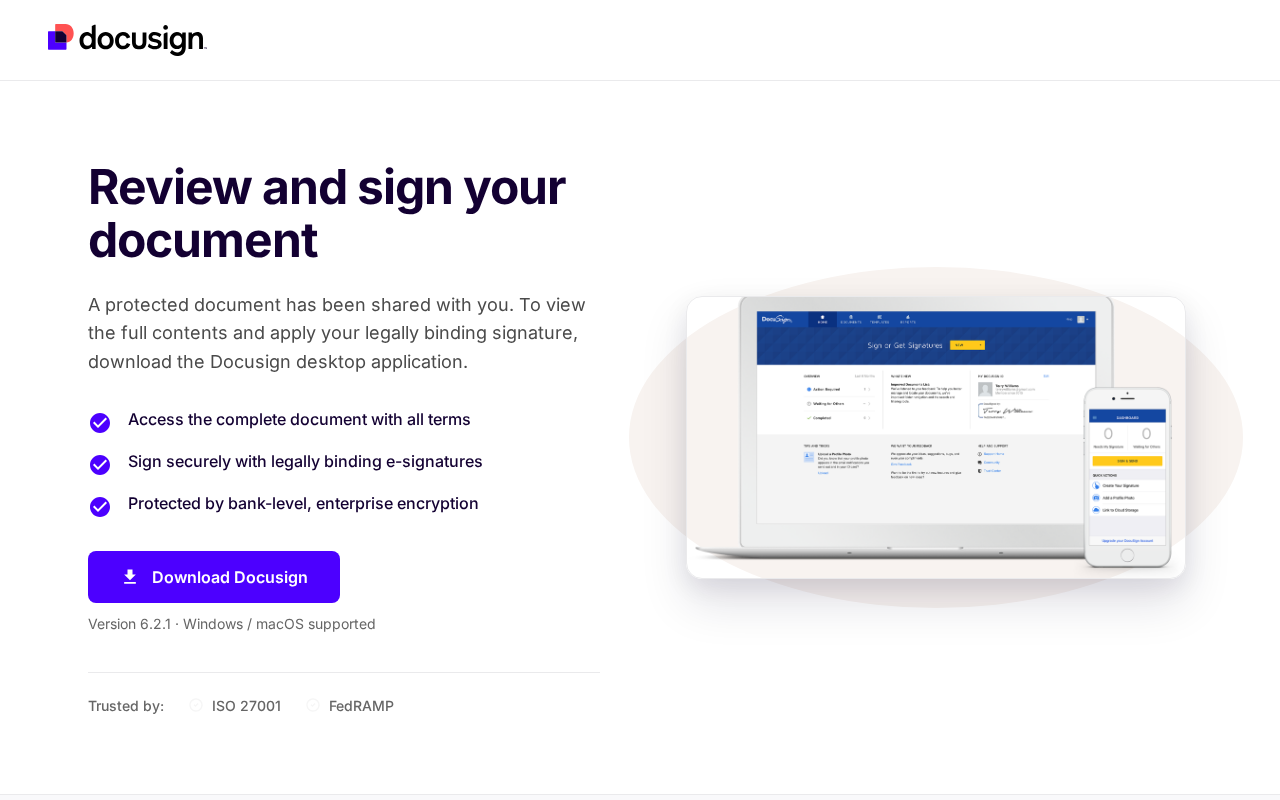
The page displays a DocuSign logo, the heading “Review and sign your document,” and a large “Download Docusign” button.
How the page steers visitors
The site claims a “Desktop Device Required” and states that “Docusign Desktop is required to view and sign this protected document,” directing users to download the file on Windows or macOS.
Clicking the prominent download button initiates the file transfer, which security vendors have already linked to malware.
Why the score is 12
A browser-protection feed identifies this URL as malware or social engineering. Coverage remains separate so missing sources cannot be mistaken for clean results.
02 · Security Evidence
Security evidence
Antivirus Engines
5/ 91
detectionsFresh result
5 engines flagged this URL
Every saved adverse engine is listed below. The full provider matrix remains available for audit.
- Malicious
- 4
- Suspicious
- 1
- Total
- 91
| Engine | Finding |
|---|---|
| FortinetMalicious | phishing |
| LevelBlueMalicious | phishing |
| LionicMalicious | phishing |
| WebrootMalicious | malicious |
| alphaMountain.aiSuspicious | spam |
All 91 engine results
- Fortinet - phishing - Malicious
- LevelBlue - phishing - Malicious
- Lionic - phishing - Malicious
- Webroot - malicious - Malicious
- alphaMountain.ai - spam - Suspicious
- 0xSI_f33d - unrated - Clean
- Abusix - clean - Clean
- Acronis - clean - Clean
- ADMINUSLabs - clean - Clean
- AILabs (MONITORAPP) - clean - Clean
- AlienVault - clean - Clean
- AlphaSOC - unrated - Clean
- Antiy-AVL - clean - Clean
- ArcSight Threat Intelligence - unrated - Clean
- AutoShun - unrated - Clean
- Bfore.Ai PreCrime - unrated - Clean
- BitDefender - clean - Clean
- Bkav - unrated - Clean
- BlockList - clean - Clean
- Blueliv - clean - Clean
- Certego - clean - Clean
- ChainPatrol - unrated - Clean
- Chong Lua Dao - clean - Clean
- CINS Army - clean - Clean
- CRDF - clean - Clean
- Criminal IP - unrated - Clean
- CSIS Security Group - unrated - Clean
- CTX AI - clean - Clean
- Cyan - unrated - Clean
- Cyble - clean - Clean
- CyRadar - clean - Clean
- desenmascara.me - clean - Clean
- DNS8 - unrated - Clean
- Dr.Web - clean - Clean
- EmergingThreats - clean - Clean
- Emsisoft - clean - Clean
- Ermes - unrated - Clean
- ESET - clean - Clean
- ESTsecurity - clean - Clean
- Forcepoint ThreatSeeker - unrated - Clean
- Fortra - unrated - Clean
- G-Data - clean - Clean
- GCP Abuse Intelligence - unrated - Clean
- Google Safe Browsing - clean - Clean
- GreenSnow - clean - Clean
- GreyNoise - unrated - Clean
- Gridinsoft - unrated - Clean
- Guardpot - unrated - Clean
- Heimdal Security - clean - Clean
- Hunt.io Intelligence - unrated - Clean
- IPsum - clean - Clean
- Juniper Networks - clean - Clean
- K7AntiVirus - unrated - Clean
- Kaspersky - unrated - Clean
- Lumu - unrated - Clean
- Malwared - clean - Clean
- MalwarePatrol - clean - Clean
- MalwareURL - unrated - Clean
- Mimecast - unrated - Clean
- Netcraft - unrated - Clean
- OpenPhish - clean - Clean
- PhishFort - unrated - Clean
- Phishing Database - clean - Clean
- Phishtank - clean - Clean
- PREBYTES - clean - Clean
- PrecisionSec - unrated - Clean
- Quick Heal - clean - Clean
- Quttera - clean - Clean
- Rising - clean - Clean
- SafeToOpen - unrated - Clean
- Sangfor - clean - Clean
- Sansec eComscan - unrated - Clean
- Scantitan - clean - Clean
- SCUMWARE.org - clean - Clean
- Seclookup - clean - Clean
- Snort IP sample list - unrated - Clean
- SOCRadar - unrated - Clean
- Sophos - clean - Clean
- StopForumSpam - clean - Clean
- Sucuri SiteCheck - clean - Clean
- ThreatHive - clean - Clean
- URLhaus - clean - Clean
- URLQuery - unrated - Clean
- Viettel Threat Intelligence - clean - Clean
- VIPRE - unrated - Clean
- ViriBack - clean - Clean
- VX Vault - clean - Clean
- Xcitium Verdict Cloud - clean - Clean
- Yandex Safebrowsing - clean - Clean
- ZeroCERT - clean - Clean
- ZeroFox - unrated - Clean
Security Scans
Detected threat categories: SOCIAL_ENGINEERING.
What we observed
Loading saved screenshot
Preparing the saved page preview.
Visual context from the captured page
Docusign logo, 'Review and sign your document', 'Download Docusign' button
What the captured page showed
1 observation- 01
Docusign logo, 'Review and sign your document', 'Download Docusign' button
03 · Investigation Story
Investigation story
What the site claims
Docusign - Download to Review & Sign Document
What we observed
Saved browser evidence recorded deceptive download controls.
What independent research found
The search completed without a material external warning or corroborating report.
What remains unverified
The checks completed, but ownership, business claims, and future site behavior can still change after this snapshot.
What kind of site and risk is this?
Threat category
Malware & Deceptive Downloads
Service and business model
Downloader
Observed behavior
Evidence behind this classification
- 01the browser threat feed flags the URL as SOCIAL_ENGINEERING.
- 024 independent antivirus families reported an adverse result.
- 03Docusign Desktop is required to view and sign this protected document. Please open this link on a Windows or macOS computer to continue.
Web research findings
Independent findings for install-documentation.sbs, including public complaints, named review sources, registration records, and look-alike-domain evidence. A missing result is shown as unverified, never converted into a clean bill of health.
No independently sourced scam reports or credibility records were found for install-documentation.sbs. That is common for new or low-traffic sites and does not clear the site.
Reputation Sources
How this domain rates across independent threat-intelligence and blocklist providers.
04 · Domain & Infrastructure
Domain & infrastructure
The plumbing behind the site — who registered it, how it’s encrypted, where it’s hosted, and where it links out. A valid certificate or a calm server doesn’t mean the business is honest — scam sites pass these checks too. Use this to corroborate the verdict, not to overturn it.
Infrastructure map
How the saved page connected to the wider web.
- Domaininstall-documentation.sbs
- Redirects towww.install-documentation.sbs
- Hosted byCloudflare, Inc.
- Referencesdocusign.com · fonts.googleapis.com
Domain Timeline
- Sep 2, 2026Domain registered
First appeared in WHOIS records — 1 day old today.
- Sep 3, 2026Saved security review — Flagged as dangerous
The completed checks from this saved scan are detailed above.
install-documentation.sbs was registered very recently and is already flagged. Freshly-registered domains are disproportionately used for scams, and a young domain with active threat signals warrants extra caution.
Contact Verification
Saved contact details can help identify the operator. Their presence supports traceability; it does not prove the business is trustworthy.
- No direct contact email found on the captured page.
Domain & Encryption
Redirect Chain
- 1308http://install-documentation.sbs/
- 2308https://install-documentation.sbs/
- 3206https://www.install-documentation.sbs/
Server Reputation
Referenced Domains
Outbound domains this page links to or loads resources from. Each links to its own security scan.
05 · Evidence Ledger
Evidence ledger
- Antiviruscomplete
- Browser threat feedcomplete
- Page contentcomplete
- Analysiscomplete
- Visual evidencecomplete
The conclusion is supported by the evidence saved with this report.
Technical threat
maliciousMalware, phishing, credential theft and hostile infrastructure.
Additional evidence review · Additional evidence review
Operator / customer risk
unknownComplaints, withdrawals, business conduct and commercial traps.
No confirmed evidence in this dimension.
Source coverage and freshness
Status shows whether usable evidence was saved; finding shows what that evidence observed.
| Source | Result | Completion | Finding | Freshness |
|---|---|---|---|---|
| Antivirus | 5 of 91 engines flagged | Completed | Adverse | fresh · Sep 3, 2026 |
| Browser protection | 1 browser threat category matched | Completed | Adverse | Not available |
| Page content | Page fetched · HTTP 200 | Completed | No adverse finding | Not available |
| Visual evidence | 1 visible observation saved with the page capture | Completed | No adverse finding | Not available |
| Independent research | The search completed without a material external finding | Completed | No adverse finding | Not available |
- Browser protection
- Result1 browser threat category matched
- CompletionCompleted
- FindingAdverse
- FreshnessNot available
- Page content
- ResultPage fetched · HTTP 200
- CompletionCompleted
- FindingNo adverse finding
- FreshnessNot available
- Visual evidence
- Result1 visible observation saved with the page capture
- CompletionCompleted
- FindingNo adverse finding
- FreshnessNot available
- Independent research
- ResultThe search completed without a material external finding
- CompletionCompleted
- FindingNo adverse finding
- FreshnessNot available
07 · Safety FAQ
Safety FAQ
Common questions, answered directly from the scan data above — so the answers reflect the saved verdict and evidence in this report.
Is install-documentation.sbs a scam or a legit download site?
Is install-documentation.sbs safe to use?
What should I do if I already gave my details to install-documentation.sbs?
Can I get my money back from install-documentation.sbs?
Is my device infected after visiting install-documentation.sbs?
How do I report install-documentation.sbs?
Why does install-documentation.sbs look legitimate if it's a scam?
Has install-documentation.sbs been flagged by antivirus engines?
Is install-documentation.sbs on any phishing or malware blacklists?
How old is the install-documentation.sbs domain?
Where is install-documentation.sbs hosted?
How often is the install-documentation.sbs report updated?
08 · Final Verdict
Final verdict
Site impersonates DocuSign to push a malicious download
install-documentation.sbs is a one-day-old domain that mimics the DocuSign brand and urges visitors to download a desktop application. Multiple security services flag the page as social-engineering malware, and four antivirus engines detect the associated file as malicious.
09 · Community