
jarretelvankortrijk.
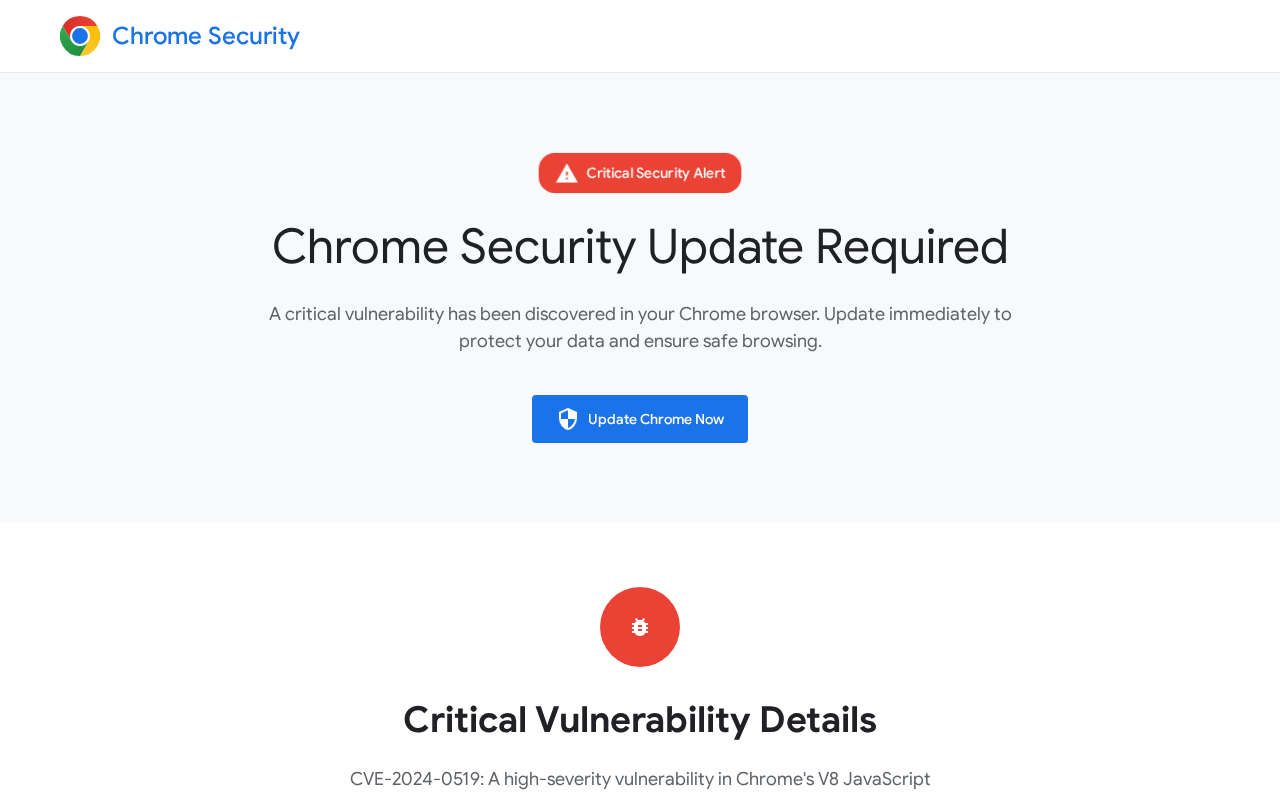
jarretelvankortrijk.be displays a fabricated Chrome security alert that instructs visitors to run keyboard commands to 'verify' an update.
At a glance
Antivirus · registration · identity- 1 engine classified the URL as malicious and 0 as suspicious; 57 returned harmless, 34 returned undetected, and 0 returned no usable result.
- Operator identity: Claimed Only. Contact details are present but not independently verified
- Google Safe Browsing returned no listed threat categories for this address at scan time.
- The site presented a valid TLSv1.3 certificate at scan time.
- A page capture was analyzed and did not record a visual clone indicator.
Intelligence
The page presents itself as an urgent Chrome security update notice using official-looking branding, a specific CVE reference, and a reCAPTCHA prompt to pressure visitors into executing commands that can deliver malware.
Evidence Map
One or more reputation sources recorded a concern
Contact details are present but not independently verified
Only partial behavior evidence was available
No reliable registration history was saved
- 1Impersonates Google Chrome branding and security warnings
- 2Uses high-pressure language about a critical vulnerability and zero-day exploit
- 3Instructs visitors to run Win+R then Ctrl+V commands
- 4One antivirus engine classified the URL as malicious
- 1Valid TLSv1.3 certificate presented at scan time
- 2No browser protection warning recorded at scan time
Observed visitor journey
Visitors land directly on http://jarretelvankortrijk.be/ and are shown a full-screen alert titled 'Chrome Security Update Required | Critical Vulnerability Found'. The page claims a high-severity flaw (CVE-2024-0519) in Chrome's V8 engine and states that immediate action is required to protect data.
Deceptive instructions
Step-by-step guidance tells users to press Win+R, then Ctrl+V, then Enter. The page frames this sequence as part of a 'security verification' process that includes a fake reCAPTCHA check.
Visual and branding tactics
- Chrome logo and security-badge styling are used throughout.
- High-pressure language references zero-day exploits and 'critical' risk.
- A large 'Update Chrome Now' button is the primary call-to-action.
- Statistics such as '5.6B+ Users Protected' and '99.9% Malware Blocked' are displayed to build false credibility.
Operator and contact details
Two phone numbers are listed on the page, but no email address or postal address appears. The operator identity is claimed only and has not been independently verified.
Technical observations at scan time
- A valid TLSv1.3 certificate was presented.
- The redirect path contained a single hop with no cross-domain or homoglyph characteristics.
- One antivirus engine flagged the URL as malicious; the hosting IP showed an abuse-confidence score of 0/100 from one report.
Website Preview
This page is a deceptive social engineering attempt designed to trick users into downloading malicious software by masquerading as a legitimate Google Chrome security update.
- 1Impersonates Google Chrome branding to create a false sense of authority
- 2Uses high-pressure language claiming a 'critical vulnerability' to induce panic
- 3Features a prominent 'Update Chrome Now' call-to-action button typical of malware distribution tactics
- 4Displays a fake security alert badge to mimic legitimate browser warnings
- 5References a specific CVE to add a veneer of technical legitimacy to a social engineering attempt
Web Research
Threat Detection
Antivirus results, browser warnings, isolated page observations, and the threat pattern identified in this report.
Antivirus engine results
Evidence behind this threat profile
- 1Impersonates Google Chrome branding and security warnings
- 2Uses high-pressure language about a critical vulnerability and zero-day exploit
- 3Instructs visitors to run Win+R then Ctrl+V commands
- 4One antivirus engine classified the URL as malicious
2 of 21 categories showed signals
This profile separates the site's primary threat from other patterns supported by the saved page evidence, public research, and security findings.
- Impersonates Google Chrome branding and security warnings
- Uses high-pressure language about a critical vulnerability and zero-day exploit
- Instructs visitors to run Win+R then Ctrl+V commands
- One antivirus engine classified the URL as malicious
- AI analyst tagged this as a tech-support scam.
- Tagged as scareware / adware / malvertising.
- Scareware / adware / notification-spam language in the tags.
Technical Details
Identity, domain, infrastructure, and connection facts saved with this scan.
July 20, 2026 at 7:01 AM UTCIdentity
6 facts- Operator
- Claimed Only
- On-domain email
- Not observed
- Other email
- Not observed
- Phone
- 2 numbers
- Postal address
- Not observed
- Social profiles
- Not observed
Domain
8 facts- Domain age
- Unavailable
- Registered
- Unavailable
- Registrar
- Unavailable
- Expires
- Unavailable
- WHOIS updated
- Unavailable
- Registrant
- Unavailable
- Registration country
- Unavailable
- WHOIS privacy
- Unavailable
Infrastructure
14 facts- HTTPS
- Valid certificate
- TLS protocol
- TLSv1.3
- Certificate issuer
- Sectigo Limited · Sectigo Public Server Authentication CA DV R36
- Certificate subject
- jarretelvankortrijk.be
- Certificate valid from
- Apr 28, 2026
- Certificate valid to
- Nov 13, 2026
- Network address
- 81.169.145.149
- ASN
- Unavailable
- Hosting organization
- STRATO AG
- Country
- DE
- Server
- Apache/2.4.68 (Unix)
- Site platform
- Unavailable
- IP reputation
- 0% confidence · 1 reports
- Tor exit node
- No
Connections
13 facts- Scan scope
- Domain
- Destination host
- jarretelvankortrijk.be
- Redirects
- 1
- Cross-domain redirect
- No
- Redirect status codes
- 301 → 200
- Lookalike characters
- Not observed
- Internationalized domain
- No
- Page response
- 200
- Observation coverage
- Unavailable
- Extracted links
- Unavailable
- Unique IPs contacted
- Unavailable
- Countries contacted
- Unavailable
- Referenced domains
- 2
What to do
Do not follow any on-screen instructions or enter keyboard commands. Close the page immediately and run a full scan with up-to-date security software.
If you paid, contact your bank or payment provider immediately and preserve receipts and messages. If you shared personal information, monitor the affected accounts and change any reused passwords through the official service.
Final Verdict
Why this verdict
The site is a tech support scam that impersonates Google Chrome with a fake CVE-2024-0519 alert, a prominent 'Update Chrome Now' button, and step-by-step instructions to press Win+R then Ctrl+V.
Do not follow any on-screen instructions or enter keyboard commands. Close the page immediately and run a full scan with up-to-date security software.
Key evidence
- 1Impersonates Google Chrome branding and security warnings
- 2Uses high-pressure language about a critical vulnerability and zero-day exploit
- 3Instructs visitors to run Win+R then Ctrl+V commands
Safety FAQ
Is jarretelvankortrijk.be safe to use?+
The site is a tech support scam that impersonates Google Chrome with a fake CVE-2024-0519 alert, a prominent 'Update Chrome Now' button, and step-by-step instructions to press Win+R then Ctrl+V.
What should I do about jarretelvankortrijk.be?+
Do not follow any on-screen instructions or enter keyboard commands. Close the page immediately and run a full scan with up-to-date security software.
How old is jarretelvankortrijk.be?+
A reliable public registration date was not available for jarretelvankortrijk.be.
What if I already interacted with jarretelvankortrijk.be?+
If you paid, contact your bank or payment provider immediately and preserve receipts and messages. If you shared personal information, monitor the affected accounts and change any reused passwords through the official service.
When was this report updated?+
This report reflects the scan completed July 20, 2026 at 7:01 AM UTC.
User reviews & comments(0)
Share your experience — "Lost $200 on a fake checkout" is more useful than "Scam". Your review helps others avoid traps.