
Tech-support scare page — do not call the number
Fake Apple storefront on the real mac.com domain that fabricates a MacBook Neo product and matches tech-support-scam patterns. Some signals suggest this is a fake support / scare page. Don't call any displayed number and don't install any "support" software.
Is mac.com legit or a scam?
Be careful — we couldn't verify this site.
Fake Apple storefront on the real mac.com domain that fabricates a MacBook Neo product and matches tech-support-scam patterns.
Score breakdown
 See the live page ↓
These checks passed — but they don't clear the site. A clean antivirus result, valid SSL, and a calm server only mean it isn't hosting malware; they say nothing about whether the business is real. This verdict is based on the site's conduct and content, not a malware detection.
If this is a scam — what it means for you
You were probably about to call a number or install 'support' software.
If it is, whoever answers takes remote control of your device, 'finds' fake problems, and charges you — or quietly steals your files and passwords.
If this is a scam, how it works
The typical trap, step by step
This site is unverified — it may be legitimate. If it is a scam, this is the playbook pages like it follow:
A fake Microsoft / Apple / antivirus alert says your PC is infected and tells you to call a number.
The “technician” has you install remote-access software.
They take control, show harmless files as scary “errors”, and demand payment to “fix” it.
They charge you — and may steal files or plant real malware while connected.
If a site follows these steps, treat it as unsafe — close it and don't enter anything.
Analysis Summary
Website Preview
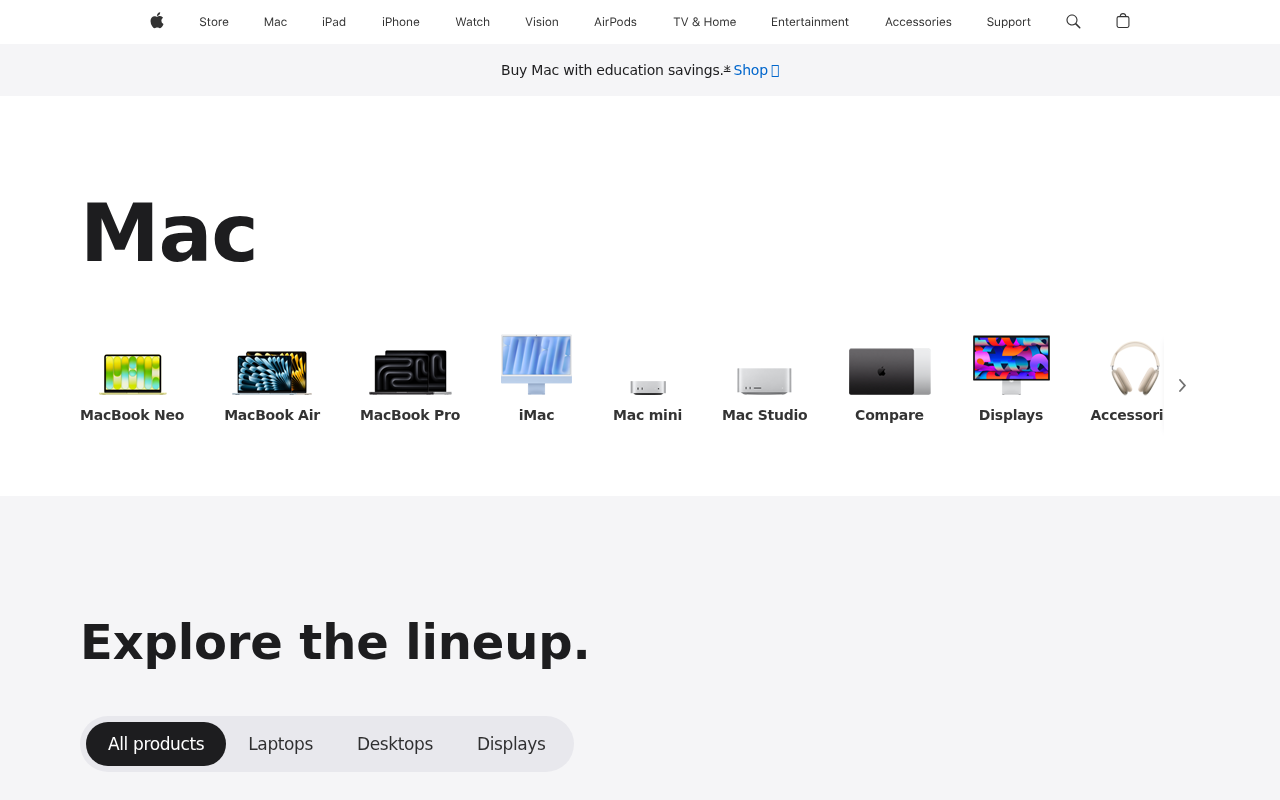
Automated page render — captured in a safe sandbox. What an ordinary visitor would see when loading the site. Marker positions are approximate. See full visual analysis →
Visual analysis
We capture a fresh screenshot of the live page and ask a vision model to look for scam visual patterns — fake trust badges, countdown timers, overlay pop-ups, and visual clones of legitimate brands.
The page visually mimics apple.com
This page is a high-fidelity clone of the official Apple website, incorporating fabricated product names like 'MacBook Neo' to deceive users.
What our vision model saw
4 signalsIncludes a non-existent 'MacBook Neo' product icon
Uses Apple branding and UI layout to impersonate the official Apple website
Inconsistent product naming conventions compared to legitimate Apple lineup
High-fidelity visual imitation of the official Apple store interface
Intelligence
The domain mac.com is genuinely owned by Apple and registered in 1996, giving it strong legitimacy on paper. However, the page content and visual analysis both identify it as a clone that inserts a fabricated MacBook Neo model and uses Apple's branding to deceive visitors. Our sandbox and antivirus engines returned clean results, yet the visual risk score reached 90/100 and the page triggered a tech-support-scam family match. The evidence package shows two unrelated mentions of mac.com email spoofing rather than reports about this storefront. The combination of a legitimate domain hosting cloned, deceptive content creates a high-risk situation that overrides the domain's age. Users should treat any contact details or purchase flows on this page as untrustworthy.
Web Research Findings
Our live research agent queries scam-report databases, consumer-review sites, news coverage, and general web search for mac.com, then cross-checks business-registration records and look-alike domain patterns. Everything below is pulled from what it actually found.
- MacRumorsopen
"Apple's consumer email domains (iCloud domains) -- mac.com, me.com and icloud.com -- have moved to a \"p=quarantine\" DMARC policy... much more likely that your mail could end up in the spam folder."
- Redditopen
"Has anyone else seen completely spoofed mac.com email addresses or could I have been actually hacked."
Domain is owned and operated by Apple Inc. as part of its iCloud and legacy email services.
Our research found two mentions of mac.com email spoofing on MacRumors and Reddit. Neither source reports the storefront or any fraudulent shopping activity on the domain. No positive reviews or business complaints appeared in the results.
Domain Timeline
- Nov 18, 1996Domain registered
First appeared in WHOIS records — 30 years old today.
- Jul 14, 2026Latest security review — Flagged as suspicious
This scan re-ran every check; the current findings are detailed above.
mac.com is an established domain now carrying threat signals. An older domain that starts tripping security checks is a classic pattern for an asset that was sold, repurposed, or compromised — the age alone is not reassurance.
Threat Detection
Scam Network
Antivirus Engines
Security Scans
Checked against the major public blocklists used by browsers and security tools — no hits.
Reputation Sources
How this domain rates across independent threat-intelligence and blocklist providers.
Scam-Type Likelihood
1 scam-type patterns detected
1 of 21 categories showed signals
We check every URL against 21 distinct scam categories so the verdict tells you not just how risky the page is, but what kind of risk it carries. Each meter pulls from page signals, web reports, our AI analyst, vision, and the scam-network cluster — not from raw AV labels.
- Classic tech-support scare copy found (fake Microsoft/Apple alert, remote-access instructions).
- Primary scraped category: fake tech-support page.
- AI analyst tagged this as a tech-support scam.
1 of 21 categories showed signals
We check every URL against 21 distinct scam categories so the verdict tells you not just how risky the page is, but what kind of risk it carries. Each meter pulls from page signals, web reports, our AI analyst, vision, and the scam-network cluster — not from raw AV labels.
- Classic tech-support scare copy found (fake Microsoft/Apple alert, remote-access instructions).
- Primary scraped category: fake tech-support page.
- AI analyst tagged this as a tech-support scam.
Technical Details
domain · encryption · redirects · server reputation · referencedThe plumbing behind the site — who registered it, how it’s encrypted, where it’s hosted, and where it links out. A valid certificate or a calm server doesn’t mean the business is honest — scam sites pass these checks too. Use this to corroborate the verdict, not to overturn it.
Contact Verification
We fetched the page and looked for real-world contact details. Legitimate businesses almost always publish an email on their own domain, a phone number, and a postal address. Scam shops usually don't.
- No contact email found anywhere on the page.
- No postal address visible on the page.
- Scam family match: Tech-Support Scam.
- Phone number listed (2430-2437).
Domain & Encryption
Redirect Chain
- 1301http://mac.com/
- 2200https://www.apple.com/mac/cross-domain
Server Reputation
Referenced Domains
Outbound domains this page links to or loads resources from. Each links to its own security scan.
What to do
Possible tech-support scare page
Pages like this impersonate Microsoft, Apple, or your ISP to trick you into calling a number or granting remote access.
- Treat mac.com as unverified
Do not enter credentials or send money until you have independently verified the business.
- Do not call the number and do not install any "support" tool
Microsoft, Apple, Google, and legitimate ISPs never show a pop-up with a phone number. Installing AnyDesk, TeamViewer, or "Windows Support" at their request hands over your computer.
- Close the page — end the browser process if needed
If the page has locked your browser, press Ctrl+Shift+Esc (Windows) or Cmd+Option+Esc (Mac) and end the browser task. Reopen your browser with "Don't restore tabs".
- OpenIf you already gave remote access or paid
Disconnect the device from the internet. Run a full scan with Malwarebytes or a reputable AV. Change your passwords from a different device. Call your bank to dispute any payment and request a new card.
Final Verdict
The page is a high-fidelity clone of Apple's website that lists a non-existent MacBook Neo product and triggers a tech-support-scam family match. The domain itself is 29.7 years old and legitimately owned by Apple, yet the content and visual analysis show clear impersonation. Do not enter any personal information or contact numbers shown on the page.
Safety FAQ
Common questions, answered directly from the scan data above — so the answers always reflect the latest verdict on this page.
- mac.com looks like a likely tech support scam — avoid interacting with it. Our review tagged it for tech support scam and clone site. The domain is 29.7 years old through Nom-iq Ltd. dba COM LAUDE. It may not be an outright scam, but the risk is high enough that you should verify it independently before trusting it with money or data.
- Proceed with caution — mac.com scores 47/100 on our trust scale. We found enough warning signals to recommend verifying it through independent channels before entering credentials or money.
- If you've already paid or handed over details on mac.com, act quickly. 1) Contact your bank or card issuer immediately and ask to dispute the charge or open a chargeback — the sooner you act, the better your odds. 2) Report the site to the U.S. FTC at reportfraud.ftc.gov or the FBI's IC3 at ic3.gov, and in the UK to Action Fraud at actionfraud.police.uk. 3) If you entered a password, change it on mac.com and anywhere you reused it, and turn on two-factor authentication. 4) Watch your bank and email for follow-up fraud, and keep screenshots as evidence.
- Often yes, if you act fast. Payments made by credit or debit card can frequently be reversed through a chargeback or dispute — contact your bank right away and explain it was a fraudulent site. Bank transfers and gift-card or voucher payments are much harder to recover, but you should still report them to your bank and to the FTC (reportfraud.ftc.gov) or Action Fraud (actionfraud.police.uk). Avoid any "refund" or "recovery" service that contacts you first — it's usually a follow-up scam.
- If you called a number or installed remote-access software from mac.com, treat your device as compromised. Tech-support scams use fake virus warnings to get you to grant remote access, then "find" problems and charge to fix them — sometimes installing real malware or stealing files. Disconnect from the internet, uninstall any remote-access tool they had you add (AnyDesk, TeamViewer, etc.), run a full antivirus scan, change important passwords from a different device, and contact your bank if you paid.
- You can report mac.com through several official channels: the U.S. FTC at reportfraud.ftc.gov, the FBI's Internet Crime Complaint Center (IC3) at ic3.gov, and — in the UK — Action Fraud at actionfraud.police.uk. You can also flag it to Google Safe Browsing (safebrowsing.google.com/safebrowsing/report_phish) so other browsers warn about it, and report it to the company being impersonated if there is one. Reporting helps get scam sites taken down faster.
- Modern scams are built to look convincing. A valid SSL padlock, a polished template, stock photos, fake reviews, and a trust badge can all be added in minutes and prove nothing about who runs the site. Scammers buy cheap domains, clone real designs, and copy legal pages wholesale. That's exactly why an automated review that checks the domain's age, hosting, blacklists, and behaviour — rather than just how the page looks — is more reliable than a first impression.
- No — all 92 antivirus and blocklist engines in our malware network currently report mac.com as clean. That's a good sign, though antivirus coverage is only one of the many signals we weigh, and brand-new scam sites can appear clean before vendors catch up.
- No — mac.com is not currently on the major browser blocklist feeds that Chrome, Safari, Firefox, and Edge rely on. Note that blocklists can lag behind brand-new scam domains, so "not listed" is reassuring but not a guarantee on its own.
- mac.com is 29.7 years old, registered on November 18, 1996 through Nom-iq Ltd. dba COM LAUDE. A multi-year registration history is one of the stronger signals against a scam, though it's never a guarantee on its own — established domains can still be misused.
- Yes — mac.com presents a valid TLSv1.3 certificate issued by Apple Inc. · Apple Public Server RSA CA 1 - G1, valid for another 44 days. Important caveat: SSL only encrypts the connection between you and the site — it does not verify who runs it. Almost all scam sites now have valid SSL too, so a padlock alone never means "safe".
- mac.com resolves to an IP operated by Apple Inc. in US (Commercial). Hosting location alone doesn't make a site good or bad — but hosting that doesn't match a brand's claimed country, or that sits on networks known for abuse, is one of the many signals we weigh alongside the verdict above.
User reviews & comments(0)
Share your experience — "Lost $200 on a fake checkout" is more useful than "Scam". Your review helps others avoid traps.