

Is my-settings-google.com safe?
http://my-settings-google.com/
Checked on
How we checked
Coverage: strong · 5 of 6 applicable core capabilities
- Antivirus (60 of 93 engines answered): completed
- Google Safe Browsing: completed
- page reading · limited: did not fully complete
- page capture: completed
- domain records: completed
- web research: completed
Six-day-old lookalike domain serves a fake Google sign-in page built to collect email credentials
my-settings-google.com is not a Google service. It is a freshly registered domain (six days old) that displays a Google-styled "Sign in" screen asking for an email address, with "Forgot password?" and "Create account" links copied from the real flow. Three antivirus families flagged the site, and independent phishing feeds list it. The page's own contact details were not reviewed because the content is built by scripts, so there is no operator identity to check against. This is a credential-harvesting page, and the score reflects that.
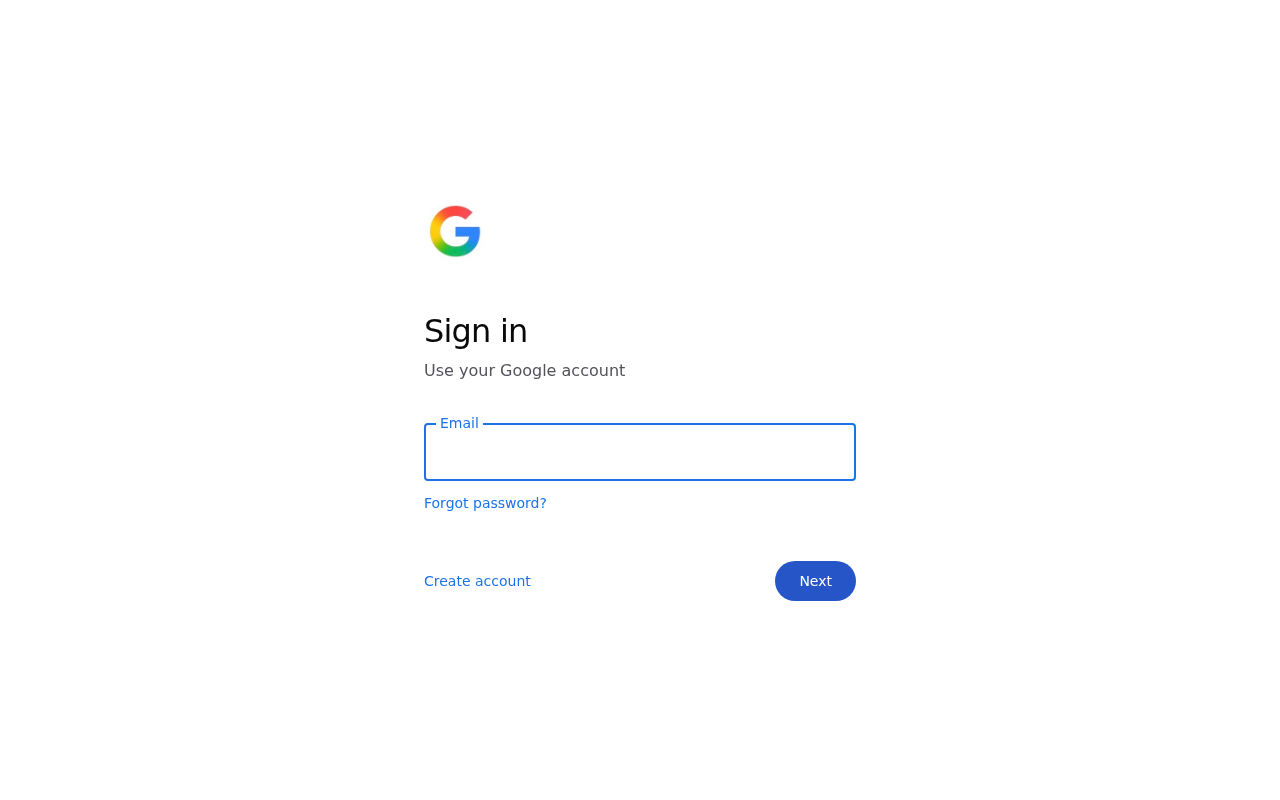 Saved site captureCaptured safely during this scan4 antivirus engines flagged this URLKaspersky, Netcraft, SOCRadar, Gridinsoft
At a glance
Saved with this scan; each value is explained in the sections below.
Domain age
6 days old
Registered Nov 2, 2026Expires Nov 2, 2027Certificate
Valid
Expires Jan 31, 2027 (83d)Hosting
United States (US)
Vercel, IncPopularity
Not in the Cloudflare Radar top list
Antivirus
4/60
4 antivirus engines flagged this URLSafe Browsing
Not flagged
Not flagged on major threat listsCommunity
No reviews yet
Checked
Nov 9, 2026
Where this site sits
- Dangerous1–20
- High Risk21–44
- Moderate Risk45–69
- Low Risk70–84
- Safe85–100
The score combines saved evidence strength and analysis quality. Coverage is reported separately.
Why 8/100
Dangerous covers scores 1–20. 6 findings pulled the score down; 2 pushed it up.
What pulled the score down
- Decisive3 independent antivirus families reported an adverse result.
- ModerateThe page renders a Google-styled "Sign in" screen with an email field, "Forgot password?", "Create account" and "Next", on a domain Google does not operate.
- Moderate2 independent sources carry complaints or warnings about this site, including: "http://my-settings-google.com"
- Moderate2 independent sources carry complaints or warnings about this site, including: "my-settings-google.com Sign in 2026-11-08RulesLow RiskAIHigh Risk “Google” in the hostnameAI analysis 2026-11-08"
- MinorThe domain is six days old and combines "my-settings" with "google" in the hostname.
- MinorThe page is script-rendered, so its contact details were not visible to our review and no operator could be identified.
What pushed the score up
- SupportsThe saved TLS check found a valid encrypted connection.
- SupportsThe browser threat feed returned no threat warning at the time of the check.
No points per finding are stored for this report: our analysis weighed all findings together to set the score. Each finding shows its saved severity instead (Decisive, Strong, Moderate or Minor).
Lost money or shared details on my-settings-google.com? Do this now
Act quickly: the first hours matter most for a chargeback.
- Call your bank or card issuer now
Ask them to dispute the charge or open a chargeback; the sooner you act, the better your odds. Card payments can often be reversed. Bank transfers and gift cards are harder, but report them to your bank too. Crypto payments usually cannot be reversed: report the wallet address and transaction ID to the exchange you sent from.
- Change any password you entered
If you entered a password on my-settings-google.com, change it there and anywhere you reused it, and turn on two-factor authentication. Keep screenshots, order confirmations and messages as evidence.
- Report the site
Reports help get scam sites taken down faster and warn other people.
- Report the domain to its registrar
Name.com, Inc. takes abuse reports at abuse@name.com (7202492374). Include the address and what happened.
- Ignore anyone offering to recover your money
"Recovery" services or agents who contact you, or ask for a fee up front, are almost always a second scam aimed at victims. Your bank's dispute process and the official reporting services never charge a fee in advance.
Full answers about refunds and reporting are in the Safety FAQ below.
01 · Investigation Brief
Investigation Brief
my-settings-google.com is not a Google service. It is a freshly registered domain (six days old) that displays a Google-styled "Sign in" screen asking for an email address, with "Forgot password?" and "Create account" links copied from the real flow. Three antivirus families flagged the site, and independent phishing feeds list it. The page's own contact details were not reviewed because the content is built by scripts, so there is no operator identity to check against. This is a credential-harvesting page, and the score reflects that.
A Google sign-in screen on a domain Google does not own
The rendered page shows "Sign in", "Use your Google account", an email field, "Forgot password?", "Create account" and a "Next" button — the exact sequence of Google's real login step. The page markup carries the same email input with autocomplete set for email, so the form is wired to accept an address and submit it onward.
The hostname is a lookalike: it strings "my-settings" and "google" together on a domain that is only six days old. Google does not run its account sign-in on a domain like this, and the site discloses no operator, registration or contact information that could be checked — the page is script-rendered, so its contact details were not visible to our page review.
Security vendors and phishing feeds already list it
Saved scanning results show 3 malicious and 1 suspicious detections across 93 engines, with three independent antivirus families — Kaspersky, Netcraft and SOCRadar — reporting an adverse result. Netcraft and SOCRadar specialise in phishing takedowns, which fits what the page displays.
Independent phishing tracking feeds also carry the URL, and a brand-abuse analysis of the hostname flags the "Google" string in the domain as high risk. These are external warnings about this exact host, not a generic category label.
Clean encryption and hosting do not make the page trustworthy
The connection is encrypted with a valid certificate and the browser threat feed returned no warning at the time of the check. Neither says anything about who runs the site: a phishing page can hold a valid certificate, and blocklist coverage lags behind new domains — this one is six days old.
The site sits on shared cloud hosting whose IP carries no abuse history (0/100 across 68 saved reports). That is normal for a platform hosting thousands of unrelated projects and tells you nothing favourable about this particular site's operator.
Why the score is 8
02 · Security Evidence
Security evidence
Antivirus Engines
4/ 93
detectionsFresh result
4 engines flagged this URL
Every saved adverse engine is listed below. The full provider matrix remains available for audit.
- Malicious
- 3
- Suspicious
- 1
- Total
- 93
- Malicious3
- Suspicious1
- Clean56
- Undetected33
| Engine | Finding |
|---|---|
| KasperskyMalicious | phishing |
| NetcraftMalicious | malicious |
| SOCRadarMalicious | phishing |
| GridinsoftSuspicious | suspicious |
All 93 engine results
- Kaspersky - phishing - Malicious
- Netcraft - Malicious
- SOCRadar - phishing - Malicious
- Gridinsoft - Suspicious
- 0xSI_f33d - Unrated
- Abusix - Clean
- Acronis - Clean
- ADMINUSLabs - Clean
- AILabs (MONITORAPP) - Clean
- AlienVault - Clean
- alphaMountain.ai - Unrated
- AlphaSOC - Unrated
- Antiy-AVL - Clean
- ArcSight Threat Intelligence - Unrated
- AutoShun - Unrated
- Bfore.Ai PreCrime - Unrated
- BitDefender - Clean
- Bkav - Unrated
- BlockList - Clean
- Blueliv - Clean
- Certego - Clean
- ChainPatrol - Unrated
- Chong Lua Dao - Clean
- CINS Army - Clean
- CRDF - Clean
- Criminal IP - Unrated
- CSIS Security Group - Unrated
- CTX AI - Clean
- Cyan - Unrated
- Cyble - Clean
- CyRadar - Clean
- desenmascara.me - Clean
- DNS8 - Unrated
- Dr.Web - Clean
- EmergingThreats - Clean
- Emsisoft - Clean
- Ermes - Unrated
- ESET - Clean
- ESTsecurity - Clean
- Forcepoint ThreatSeeker - Clean
- Fortinet - Clean
- Fortra - Unrated
- G-Data - Clean
- GCP Abuse Intelligence - Unrated
- Google Safe Browsing - Clean
- GreenSnow - Clean
- GreyNoise - Unrated
- Guardpot - Unrated
- Heimdal Security - Clean
- Hunt.io Intelligence - Unrated
- IPsum - Clean
- Juniper Networks - Clean
- K7AntiVirus - Unrated
- LevelBlue - Clean
- Lionic - Clean
- Lumu - Unrated
- Malwared - Clean
- MalwarePatrol - Clean
- MalwareURL - Unrated
- Mimecast - Unrated
- OpenPhish - Clean
- Orcapot - Unrated
- PhishFort - Unrated
- Phishing Database - Clean
- Phishtank - Clean
- PREBYTES - Clean
- PrecisionSec - Unrated
- Quick Heal - Clean
- Quttera - Clean
- Rising - Clean
- SafeToOpen - Unrated
- Sangfor - Clean
- Sansec eComscan - Unrated
- Scantitan - Clean
- SCUMWARE.org - Clean
- Seclookup - Clean
- Snort IP sample list - Unrated
- Sophos - Clean
- StopForumSpam - Clean
- Sucuri SiteCheck - Clean
- Synthient - Unrated
- ThreatHive - Clean
- URLhaus - Clean
- URLQuery - Unrated
- Viettel Threat Intelligence - Clean
- VIPRE - Unrated
- ViriBack - Clean
- VX Vault - Clean
- Webroot - Clean
- Xcitium Verdict Cloud - Unrated
- Yandex Safebrowsing - Clean
- ZeroCERT - Clean
- ZeroFox - Unrated
How security vendors categorise this site
- Forcepoint ThreatSeekernewly registered websites
Each vendor’s own label for the site, saved with the antivirus result. Labels are separate from the engine verdicts above and can disagree with each other.
Security Scans
Checked against the browser threat feeds available to this scan — no hit.
What we observed
Visual warning signs were identified
Sign in Use your Google account Email Forgot password? Create account Next
What the captured page showed
1 observation- 01
Sign in Use your Google account Email Forgot password? Create account Next
Browser behavior
What our isolated browser recorded while it loaded the page. Host names only: no full addresses are published.
- Pop-ups
- 0
- Download attempts
- 0
- Notification prompts
- 0
- Navigations
- 2
- Other hosts contacted
- 1
Where the page went
- First loadmy-settings-google.comSame site
- On its ownmy-settings-google.comSame site
Hosts on our aggressive-advertising list
None contacted.
Test clicks
No test click was made on this page.
What the page says about itself
Quoted from the pages we read: the site's own words, not our findings.
- Page title
Sign in
- Meta description
Sign in to Salmon Salad.
Pages we read
- Main page/Read
03 · Investigation Story
Investigation story
What the site claims
Sign in
What we observed
The page content was captured and checked alongside 60 antivirus results.
What independent research found
2 external findings were saved and compared with the page evidence.
What remains unverified
1 of the 6 applicable core capabilities did not complete, so those gaps remain visible in the coverage ledger.
What kind of site and risk is this?
Threat category
Phishing & Impersonation
Service and business model
Login Portal
Observed behavior
Evidence behind this classification
- 01The hosting IP has an abuse confidence score of 0/100 across 68 saved reports, which reflects shared cloud hosting rather than this site's conduct.
- Also 9 listed above
What this means for you
What happens when someone types their address
A visitor who lands here sees a Google-branded sign-in prompt and is asked to enter their Google account email, then press "Next" — the same first step as the genuine login, so the request feels routine.
How the observed mechanism works
The evidence-backed path
Each stage below is preserved from the grounded analysis and linked to saved evidence.
The address is submitted to this domain rather than to Google, and the page continues the flow with "Forgot password?" and "Create account" links that keep the visitor inside the imitation. The page's purpose, as identified by the phishing feeds and vendor detections, is collecting those credentials.
Do not enter your email, password or any Google verification code on this page. Close the tab and reach your Google account only by typing accounts.google.com yourself or opening the app. If you already submitted your address or password here, change your Google password immediately, sign out of other sessions, and turn on two-step verification.
Web research findings
Independent findings for my-settings-google.com, including public complaints, named review sources, registration records, and look-alike-domain evidence.
Reputation Sources
How this domain rates across independent threat-intelligence and blocklist providers.
04 · Domain & Infrastructure
Domain & infrastructure
The plumbing behind the site — who registered it, how it’s encrypted, where it’s hosted, and where it links out. A valid certificate or a calm server doesn’t mean the business is honest — scam sites pass these checks too.
Infrastructure map
- Domainmy-settings-google.com
- Redirects towww.my-settings-google.com
- Hosted byVercel, Inc
- Referencesmu4lkdtjszjvio9g.public.blob.vercel-storage.com
Domain Timeline
- Nov 2, 2026Domain registered
First appeared in WHOIS records — 6 days old when this review was saved.
- Nov 9, 2026Saved security review — Rated Dangerous
The completed checks from this saved scan are detailed above.
my-settings-google.com was registered very recently when this review was saved and was already flagged. Freshly-registered domains are disproportionately used for scams, and a young domain with active threat signals warrants extra caution.
Contact Verification
Saved contact details can help identify the operator. Their presence supports traceability; it does not prove the business is trustworthy.
Domain & Encryption
At the scan on Nov 9, 2026: 2% of the registration period had passed
Report this domain to its registrar: send the address and what happened to this contact.
A certificate issued weeks or days before the scan on a domain registered recently is common on short-lived sites, though new legitimate sites look the same.
At the scan on Nov 9, 2026: 7% of the validity period had passed
Certificate issued for www.my-settings-google.com.
A shared content-delivery network address answers for many sites, so it is not the site's own server and says nothing about who runs it.
Payment providers the page loads
None seen among the outside domains we saved.
Read from the first 20 outside domains the page loads and the shop platform it uses; the web server and platform rows are under Hosting & Technology. A payment script on the page does not prove the shop accepts that method at checkout, or that you are protected.
Redirect Chain
- 1308http://my-settings-google.com/
- 2308https://my-settings-google.com/
- 3200https://www.my-settings-google.com/
Server Reputation
Referenced Domains
Outbound domains this page links to or loads resources from. Each links to its own security scan.
Grouped by what each domain is for. in page: named in the page’s HTML. contacted: the browser loaded it while rendering the page. ad list: on our aggressive-advertising list.
Other / unknown1
- mu4lkdtjszjvio9g.public.blob.vercel-storage.comin pagecontacted
05 · Evidence Ledger
Evidence ledger
- Antiviruscomplete
- Browser threat feedcomplete
- Page contentpartial
- Analysiscomplete
- Visual evidencecomplete
The conclusion is supported by the evidence saved with this report.
Technical threat
maliciousMalware, phishing, credential theft and hostile infrastructure.
Operator / customer risk
suspiciousComplaints, withdrawals, business conduct and commercial traps.
Source coverage and freshness
Status shows whether usable evidence was saved; finding shows what that evidence observed.
| Source | Result | Completion | Finding | Freshness |
|---|---|---|---|---|
| Antivirus | 4 of 93 engines flagged | Completed | Adverse | fresh · analysed Nov 8, 2026 |
| Browser protection | No browser threat-list match | Completed | No adverse finding | this scan · Nov 9, 2026 |
| Page content | Page fetched · HTTP 200 | Limited | No saved finding | this scan · Nov 9, 2026 |
| Visual evidence | 1 visible observation saved with the page capture | Completed | Adverse | this scan · Nov 9, 2026 |
| Independent research | 2 independent findings were saved | Completed | Adverse | this scan · Nov 9, 2026 |
- Antivirus
- Result4 of 93 engines flagged
- CompletionCompletedFindingAdverse
- Freshnessfresh · analysed Nov 8, 2026
- Browser protection
- ResultNo browser threat-list match
- CompletionCompletedFindingNo adverse finding
- Freshnessthis scan · Nov 9, 2026
- Page content
- ResultPage fetched · HTTP 200
- CompletionLimitedFindingNo saved finding
- Freshnessthis scan · Nov 9, 2026
- Visual evidence
- Result1 visible observation saved with the page capture
- CompletionCompletedFindingAdverse
- Freshnessthis scan · Nov 9, 2026
- Independent research
- Result2 independent findings were saved
- CompletionCompletedFindingAdverse
- Freshnessthis scan · Nov 9, 2026
07 · Safety FAQ
Safety FAQ
Answered from the saved verdict and evidence in this report.
Is my-settings-google.com a scam or a legit website?
Is my-settings-google.com safe to use?
I already paid or entered my details on my-settings-google.com — what should I do?
Can I get my money back from my-settings-google.com?
Did my-settings-google.com steal my password or personal information?
How do I report my-settings-google.com?
my-settings-google.com looks professional — how can it still be a scam?
Has my-settings-google.com been flagged by antivirus engines?
Is my-settings-google.com on any phishing or malware blacklists?
How old is the my-settings-google.com domain?
Where is my-settings-google.com hosted?
How often is the my-settings-google.com report updated?
08 · Final Verdict
Final verdict
Six-day-old lookalike domain serves a fake Google sign-in page built to collect email credentials
my-settings-google.com is not a Google service. It is a freshly registered domain (six days old) that displays a Google-styled "Sign in" screen asking for an email address, with "Forgot password?" and "Create account" links copied from the real flow. Three antivirus families flagged the site, and independent phishing feeds list it. The page's own contact details were not reviewed because the content is built by scripts, so there is no operator identity to check against. This is a credential-harvesting page, and the score reflects that.
09 · Community
Community
Are you the owner of my-settings-google.com?Verify and reply