

Is thepcbuddy.com safe?
http://thepcbuddy.com/
Checked on
How we checked
Coverage: partial · 5 of 6 applicable core capabilities
- Antivirus (56 of 62 engines answered) · saved result: did not fully complete
- Google Safe Browsing: completed
- page reading: completed
- page capture: completed
- domain records: completed
- web research: completed
New remote tech-support site with no verifiable operator identity and ad-network scripts on a service page
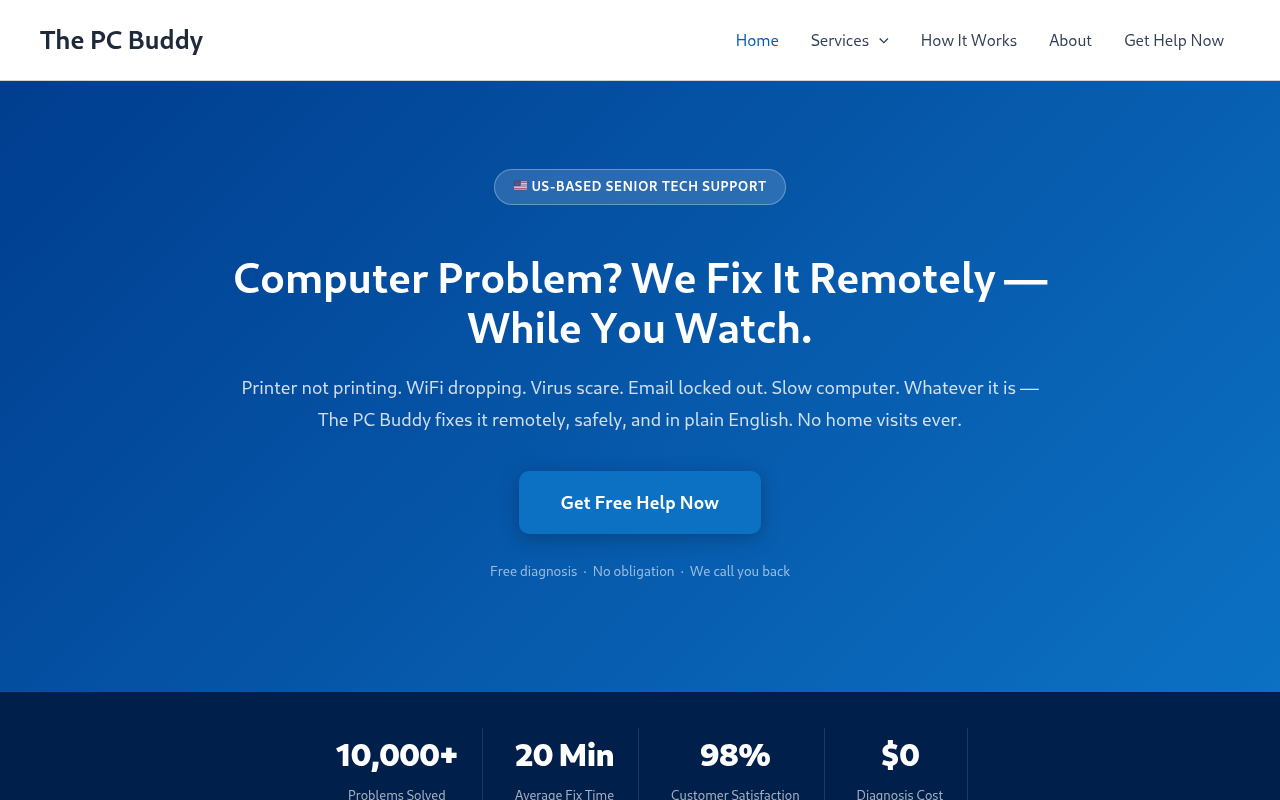
The PC Buddy presents itself as a remote computer-repair service that fixes problems while the customer watches, and it funnels visitors toward a 'Get Free Help Now' contact form rather than a published phone number, email address or company registration. The domain is only about ten months old, and the rendered page loads scripts from two advertising networks that are unusual for a professional support business. No malware, phishing or Safe Browsing flags were found, and the connection is encrypted, but the combination of an unverifiable operator, a remote-access business model and third-party ad scripts keeps this in the moderate-risk band rather than safe.
Where this site sits
- Dangerous1–20
- High Risk21–44
- Moderate Risk45–69
- Low Risk70–84
- Safe85–100
The score combines saved evidence strength and analysis quality. Coverage is reported separately.
Why 58/100
Moderate Risk covers scores 45–69. 2 findings pulled the score down; 1 pushed it up.
What pulled the score down
- ModerateThe rendered page contacted 2 networks commonly used for aggressive advertising.-34 pts
- MinorThe site publishes no direct contact email, physical address, registration number or named operator, which is a serious transparency gap for a remote-access support business.
What pushed the score up
- SupportsThe browser threat feed returned no threat warning and the saved TLS check found a valid encrypted connection.
Points come from the saved evidence ledger: it lowered the score from 92 to 58 and split those 34 points between the findings that show points; the others carry no points in the ledger. Community reviews never change the Safety Score.
01 · Investigation Brief
Investigation Brief
The PC Buddy presents itself as a remote computer-repair service that fixes problems while the customer watches, and it funnels visitors toward a 'Get Free Help Now' contact form rather than a published phone number, email address or company registration. The domain is only about ten months old, and the rendered page loads scripts from two advertising networks that are unusual for a professional support business. No malware, phishing or Safe Browsing flags were found, and the connection is encrypted, but the combination of an unverifiable operator, a remote-access business model and third-party ad scripts keeps this in the moderate-risk band rather than safe.
Who is actually behind the site?
The captured page does not show a direct contact email, and the site does not publish a physical address, registration number or named operator. For a business that asks customers to hand over remote control of their computers, that absence of verifiable identity is the single most important risk factor here.
The registrable domain is only 308 days old, so there is no long operating history to fall back on when judging whether the operator is established. A saved antivirus analysis exists, but it dates from April 2015, before the domain's current registration on December 29, 2025, so it describes an earlier owner's site and counts neither for nor against this one.
Technical checks are clean, but the commercial setup is unusual
The browser threat feed returned no threat warning and the saved TLS check found a valid encrypted connection, so there is no evidence of malware delivery, phishing or a broken certificate at the time of analysis. Those are real positives, but they only mean no detections were recorded, not that the operator is trustworthy.
The rendered page contacted two networks commonly used for aggressive advertising, static.trafficjunky.com and ads.trafficjunky.net. Loading adult-oriented ad-network scripts on a page that markets computer repair to seniors is a mismatch that a legitimate professional support business would not normally have, and it raises the possibility that visitor traffic is being monetised in ways unrelated to the advertised service.
The main call to action is a 'Get Free Help Now — It's Fast & Easy' button that leads into a contact form for a free diagnosis. The site also runs on a standard Astra WordPress theme, which is a neutral technical detail and not evidence of wrongdoing by itself.
Why the score is 58
The rendered page contacted 2 networks commonly used for aggressive advertising. Coverage remains separate so missing sources cannot be mistaken for clean results.
02 · Security Evidence
Security evidence
Antivirus Engines
0/ 62
No resultsSaved analysis from April 1, 2015 - stale
Analysis predates the current registration
The saved antivirus analysis is from April 1, 2015, which is before this domain's current registration, so it may describe an earlier owner. It is not counted as a clean result.
- Malicious
- 0
- Suspicious
- 0
- Total
- 62
All 62 engine results
- ADMINUSLabs - Clean
- AlienVault - Clean
- Antiy-AVL - Clean
- AutoShun - Unrated
- Avira - Clean
- Baidu-International - Clean
- BitDefender - Clean
- Blueliv - Clean
- C-SIRT - Clean
- CLEAN MX - Clean
- Comodo Site Inspector - Clean
- CRDF - Clean
- CyberCrime - Clean
- Dr.Web - Clean
- Emsisoft - Clean
- ESET - Clean
- Fortinet - Clean
- Fortra - Unrated
- FraudSense - Clean
- G-Data - Clean
- Google Safe Browsing - Clean
- K7AntiVirus - Clean
- Kaspersky - Clean
- Lionic - Clean
- Malc0de Database - Clean
- Malekal - Clean
- Malware Domain Blocklist - Clean
- Malwarebytes hpHosts - Clean
- Malwared - Clean
- MalwareDomainList - Clean
- MalwarePatrol - Clean
- malwares.com URL checker - Clean
- Netcraft - Unrated
- OpenPhish - Clean
- Opera - Clean
- PalevoTracker - Clean
- ParetoLogic - Clean
- Phishtank - Clean
- Quttera - Clean
- Rising - Clean
- SCUMWARE.org - Clean
- SecureBrain - Clean
- Sophos - Unrated
- Spam404 - Clean
- SpyEyeTracker - Clean
- StopBadware - Unrated
- Sucuri SiteCheck - Clean
- Tencent - Clean
- ThreatHive - Clean
- Trustwave - Clean
- URLQuery - Clean
- VX Vault - Clean
- Web Security Guard - Clean
- Websense ThreatSeeker - Unrated
- Webutation - Clean
- Wepawet - Clean
- Yandex Safebrowsing - Clean
- ZCloudsec - Clean
- ZDB Zeus - Clean
- Zerofox - Clean
- ZeusTracker - Clean
- zvelo - Clean
How security vendors categorise this site
- Dr.Webnot recommended site
- Websense ThreatSeekeruncategorized
Each vendor’s own label for the site, saved with the antivirus result. Labels are separate from the engine verdicts above and can disagree with each other.
Security Scans
Checked against the browser threat feeds available to this scan — no hit.
What we observed
Loading saved screenshot
Preparing the saved page preview.
Visual context from the captured page
Computer Problem? We Fix It Remotely — While You Watch.
What the captured page showed
1 observation- 01
Computer Problem? We Fix It Remotely — While You Watch.
What the page says about itself
What the site says about itself, quoted from the pages we read. The site wrote these words; they are not our findings.
- Page title
Remote Computer Help for Seniors | The PC Buddy
- Meta description
Printer not working? WiFi down? Virus? Email issues? The PC Buddy fixes your computer problems remotely — fast, safe, and in plain English. US-based support.
Pages we read
- Main page/Read
- About page/about/Read
- Support / FAQ/services/printer-help/Read
03 · Investigation Story
Investigation story
What the site claims
Remote Computer Help for Seniors | The PC Buddy
What we observed
The page content was captured and checked alongside 56 antivirus results.
What independent research found
The search completed without a material external warning or corroborating report.
What remains unverified
1 of the 6 applicable core capabilities did not complete, so those gaps remain visible in the coverage ledger.
What kind of site and risk is this?
Threat category
No threat category confirmed
Service and business model
Shop
Observed behavior
Evidence behind this classification
- 01The registrable domain is 308 days old, so there is no long operating history to assess.
- 02The site publishes no direct contact email, physical address, registration number or named operator, which is a serious transparency gap for a remote-access support business.
- 03The rendered page contacted 2 networks commonly used for aggressive advertising.
If this is a scam — what it means for you
What happens when a visitor asks for help
A visitor who clicks the 'Get Free Help Now' button is routed into a contact form for a free diagnosis rather than being given a published phone number or email address to verify the business independently.
If this is a scam, how it works
The evidence-backed path
Each stage below is preserved from the grounded analysis and linked to saved evidence.
The site's own headline promises to fix computer problems remotely while the customer watches, which means the next step in the funnel would involve granting a stranger remote access to the visitor's machine. Because no operator name, address or registration is published, the visitor has no way to confirm who would be on the other end of that session.
Do not grant remote access to your computer or pay for support through this site until you can independently verify the operator. Ask for a company name, a physical address and a phone number, and check whether the business is registered before letting anyone connect to your machine. If you only need help with a computer problem, use a manufacturer's official support channel or a local repair shop you can visit in person.
Web research findings
Independent findings for thepcbuddy.com, including public complaints, named review sources, registration records, and look-alike-domain evidence. A missing result is shown as unverified, never converted into a clean bill of health.
No independently sourced scam reports or credibility records were found for thepcbuddy.com. That is common for new or low-traffic sites and does not clear the site.
Reputation Sources
How this domain rates across independent threat-intelligence and blocklist providers.
04 · Domain & Infrastructure
Domain & infrastructure
The plumbing behind the site — who registered it, how it’s encrypted, where it’s hosted, and where it links out. A valid certificate or a calm server doesn’t mean the business is honest — scam sites pass these checks too. Use this to corroborate the verdict, not to overturn it.
Infrastructure map
How the saved page connected to the wider web.
- Domainthepcbuddy.com
- Redirects tothepcbuddy.com
- Hosted byBrander Group Inc.
- Referencesgmpg.org · cdn-reach.hostinger.com
Domain Timeline
- Dec 29, 2025Domain registered
First appeared in WHOIS records — 10 months old when this review was saved.
- Nov 2, 2026Saved security review — Rated Moderate Risk
The evidence in this saved scan is mixed or incomplete; the completed checks are detailed above.
Contact Verification
Saved contact details can help identify the operator. Their presence supports traceability; it does not prove the business is trustworthy.
- No direct contact email found on the captured page.
Domain & Encryption
Certificate issued for thepcbuddy.com.
A shared content-delivery network address answers for many sites, so it is not the site's own server and says nothing about who runs it.
Analytics and ads
- Google Tag Manager
Payment providers the page loads
None seen among the outside domains we saved.
Read from the first 20 outside domains the page loads and the shop platform it uses; the web server and platform rows are under Hosting & Technology. A payment script on the page does not prove the shop accepts that method at checkout, or that you are protected.
Redirect Chain
- 1301http://thepcbuddy.com/
- 2206https://thepcbuddy.com/
Server Reputation
Referenced Domains
Outbound domains this page links to or loads resources from. Each links to its own security scan.
05 · Evidence Ledger
Evidence ledger
- Antiviruspartial
- Browser threat feedcomplete
- Page contentcomplete
- Analysiscomplete
- Visual evidencecomplete
The conclusion is supported by the evidence saved with this report.
Technical threat
unknownMalware, phishing, credential theft and hostile infrastructure.
No confirmed evidence in this dimension.
Operator / customer risk
suspiciousComplaints, withdrawals, business conduct and commercial traps.
The rendered page contacted 2 networks commonly used for aggressive advertising. · The site publishes no direct contact email, physical address, registration number or named operator, which is a serious transparency gap for a remote-access support business.
Source coverage and freshness
Status shows whether usable evidence was saved; finding shows what that evidence observed.
| Source | Result | Completion | Finding | Freshness |
|---|---|---|---|---|
| Antivirus | 0 of 62 engines flagged | Limited | No saved finding | stale fallback · analysed Apr 1, 2015 |
| Browser protection | No browser threat-list match | Completed | No adverse finding | this scan · Nov 2, 2026 |
| Page content | Page fetched · HTTP 200 | Completed | No adverse finding | this scan · Nov 2, 2026 |
| Visual evidence | 1 visible observation saved with the page capture | Completed | No adverse finding | this scan · Nov 2, 2026 |
| Independent research | The search completed without a material external finding | Completed | No adverse finding | this scan · Nov 2, 2026 |
- Antivirus
- Result0 of 62 engines flagged
- CompletionLimitedFindingNo saved finding
- Freshnessstale fallback · analysed Apr 1, 2015
- Browser protection
- ResultNo browser threat-list match
- CompletionCompletedFindingNo adverse finding
- Freshnessthis scan · Nov 2, 2026
- Page content
- ResultPage fetched · HTTP 200
- CompletionCompletedFindingNo adverse finding
- Freshnessthis scan · Nov 2, 2026
- Visual evidence
- Result1 visible observation saved with the page capture
- CompletionCompletedFindingNo adverse finding
- Freshnessthis scan · Nov 2, 2026
- Independent research
- ResultThe search completed without a material external finding
- CompletionCompletedFindingNo adverse finding
- Freshnessthis scan · Nov 2, 2026
07 · Safety FAQ
Safety FAQ
Common questions, answered directly from the scan data above — so the answers reflect the saved verdict and evidence in this report.
Is thepcbuddy.com a scam or is it safe?
Is thepcbuddy.com safe to use?
Has thepcbuddy.com been flagged by antivirus engines?
Is thepcbuddy.com on any phishing or malware blacklists?
How old is the thepcbuddy.com domain?
Does thepcbuddy.com have a valid SSL certificate?
Where is thepcbuddy.com hosted?
How often is the thepcbuddy.com report updated?
08 · Final Verdict
Final verdict
New remote tech-support site with no verifiable operator identity and ad-network scripts on a service page
The PC Buddy presents itself as a remote computer-repair service that fixes problems while the customer watches, and it funnels visitors toward a 'Get Free Help Now' contact form rather than a published phone number, email address or company registration. The domain is only about ten months old, and the rendered page loads scripts from two advertising networks that are unusual for a professional support business. No malware, phishing or Safe Browsing flags were found, and the connection is encrypted, but the combination of an unverifiable operator, a remote-access business model and third-party ad scripts keeps this in the moderate-risk band rather than safe.
09 · Community
Community
Are you the owner of thepcbuddy.com?Verify and reply