
Warning signs detected
Official UC Browser landing page with 23-year-old domain but multiple documented privacy and security issues reported by researchers. Several risk indicators suggest caution. This site might be legitimate — but treat it as unverified until you can independently confirm.
Is ucweb.com legit or a scam?
Official UC Browser landing page with 23-year-old domain but multiple documented privacy and security issues reported by researchers.
These checks passed — but they don't clear the site. A clean antivirus result, valid SSL, and a calm server only mean it isn't hosting malware; they say nothing about whether the business is real. This verdict is based on the site's conduct and content, not a malware detection.
Analysis Summary
Website Preview
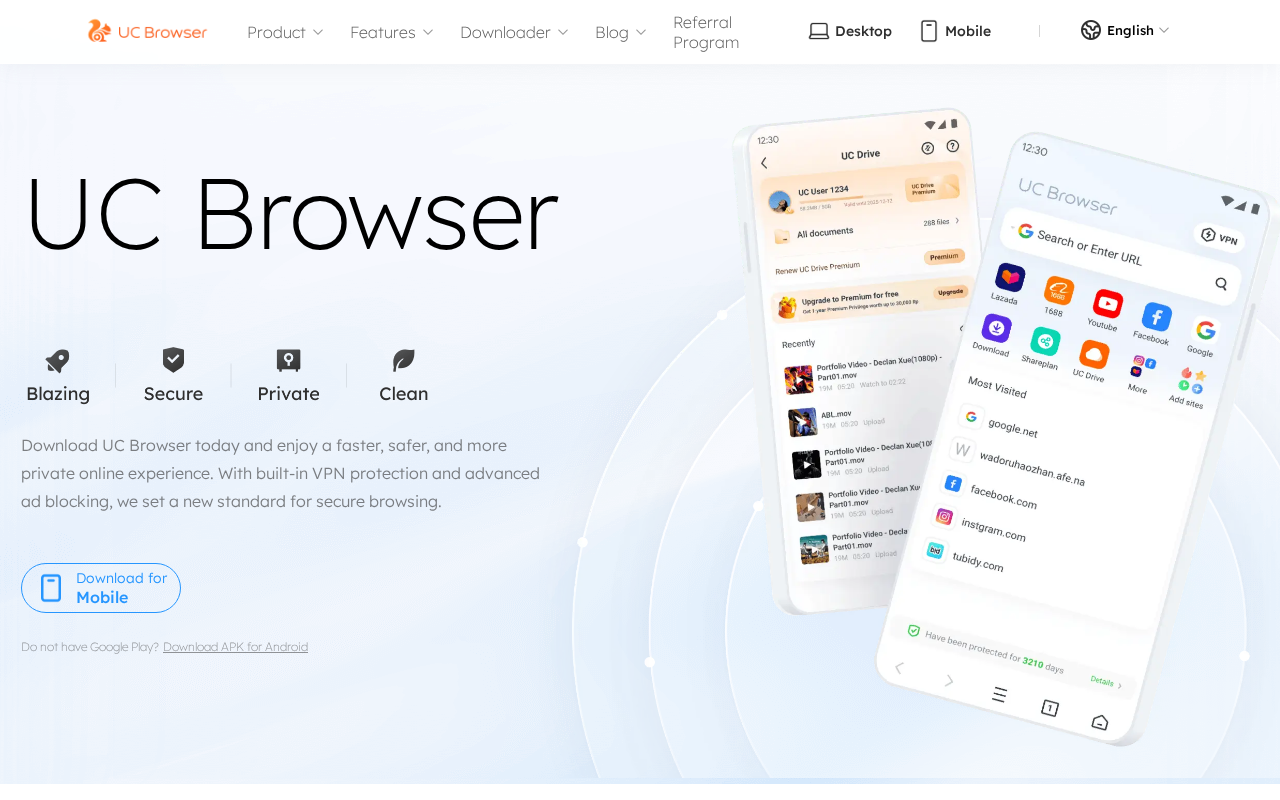
Automated page render — captured in a safe sandbox. What an ordinary visitor would see when loading the site. See full visual analysis →
Visual analysis
We capture a fresh screenshot of the live page and ask a vision model to look for scam visual patterns — fake trust badges, countdown timers, overlay pop-ups, and visual clones of legitimate brands.
Visual red flags detected in the screenshot
The page appears to be a professionally designed, fully-rendered landing page for UC Browser with no immediate visual indicators of a scam or malicious intent.
What our vision model saw
5 signalsProfessional layout consistent with official software landing pages
High-quality graphics and UI mockups for mobile devices
Functional navigation menu with product, features, and blog links
Standard call-to-action buttons for mobile and APK downloads
No visible urgency tactics, fake trust badges, or intrusive pop-ups
Intelligence
The domain ucweb.com is 23.1 years old and registered to Alibaba Cloud, with the company confirmed as a legitimate Alibaba Group subsidiary. Our antivirus network returned zero detections and the hosting IP shows no abuse history. However, the evidence package contains three separate reports from Citizen Lab, BleepingComputer, and user forums highlighting unencrypted data transmission and man-in-the-middle risks in the browser itself. The browser was banned in India in 2020 over data security concerns. While the page itself is not distributing malware, the documented history of privacy problems and aggressive data collection practices creates ongoing risk for users who install the software.
Web Research Findings
Our live research agent queries scam-report databases, consumer-review sites, news coverage, and general web search for ucweb.com, then cross-checks business-registration records and look-alike domain patterns. Everything below is pulled from what it actually found.
- UCWeb is a legitimate subsidiary of the Alibaba Group, founded in 2004 and headquartered in Guangzhou, China.
- The domain ucweb.com is the official site for UC Browser, which has over 500 million downloads on the Google Play Store.
- Multiple cybersecurity organizations, including Citizen Lab and Zscaler, have documented significant privacy and security vulnerabilities, such as unencrypted data transmission and MiTM risks.
- The browser was banned in India in 2020 by the Ministry of Information Technology due to data security and privacy concerns.
- Users frequently report aggressive advertising, unwanted redirects, and high data collection practices in reviews.
- Snowden-leaked documents previously suggested that intelligence agencies exploited vulnerabilities in the browser to track users.
- Citizen Labopen
"Our analysis finds that all versions of the browser examined, both Windows and Android, transmit personal user data with easily decryptable encryption."
- BleepingComputeropen
"UC Browser and UC Browser Mini Android apps... exposed their users to man-in-the-middle (MiTM) attacks by downloading an Android Package Kit (APK) from a third party server."
- DoItYourself.com Communityopen
"upon clicking a legit PayPal login page I was taken to a strange looking, very bare page advertising their app... and then a 2nd login... I started to feel like I had just been scammed."
- MouthShutopen
"This is a most usable and trustable browser as well as somes interesting features... I fully satisfied about there performance as well as browsing speed also."
- G2open
"I like that UC! Web allows me to check items in and out, which is not something easily done with spreadsheets... These features are valuable."
Owned by Alibaba Group; registered as UCWeb Inc. in Guangzhou, with subsidiaries like UCWeb Mobile Private Limited in India.
Our research found three security reports from Citizen Lab and BleepingComputer documenting data transmission vulnerabilities and APK download risks in UC Browser. The browser was banned in India in 2020 over privacy concerns. User complaints total 85 across platforms, mainly about aggressive advertising and data collection. Two positive reviews appear on MouthShut and G2. The company is confirmed as a legitimate Alibaba Group subsidiary.
Domain Timeline
- May 20, 2003Domain registered
First appeared in WHOIS records — 23 years old today.
- Jul 11, 2026Latest security review — Flagged as suspicious
This scan re-ran every check; the current findings are detailed above.
ucweb.com is an established domain now carrying threat signals. An older domain that starts tripping security checks is a classic pattern for an asset that was sold, repurposed, or compromised — the age alone is not reassurance.
Threat Detection
Antivirus Engines
Security Scans
Checked against the major public blocklists used by browsers and security tools — no hits.
Reputation Sources
How this domain rates across independent threat-intelligence and blocklist providers.
Technical Details
domain · encryption · redirects · server reputation · referencedContact Verification
We fetched the page and looked for real-world contact details. Legitimate businesses almost always publish an email on their own domain, a phone number, and a postal address. Scam shops usually don't.
- No contact email found anywhere on the page.
- No postal address visible on the page.
- Phone number listed (09210879).
Domain & Encryption
Redirect Chain
- 1301http://ucweb.com/
- 2200https://www.ucweb.com/
Server Reputation
Referenced Domains
Outbound domains this page links to or loads resources from. Each links to its own security scan.
What to do
Proceed with caution
Our automated review flagged enough risk that you should treat this site as unverified.
- Treat ucweb.com as unverified
Do not enter credentials or send money until you have independently verified the business.
- Verify the business through independent channels
Check the company's social profiles, registry records, and search for recent news or reviews that are not hosted on the site itself.
- Never use irreversible payment methods
Crypto, gift cards, wire transfers, and cash apps offer zero buyer protection. Use a credit card or PayPal if you must pay.
- OpenShare your experience
If you have additional context, drop a comment below or post on the MalwareTips forum.
Final Verdict
UC Browser's official site promotes a legitimate product but carries documented privacy and security concerns. Multiple independent reports detail data transmission issues and past vulnerabilities. Users should weigh these risks before installing.
Safety FAQ
Common questions, answered directly from the scan data above — so the answers always reflect the latest verdict on this page.
- ucweb.com shows strong warning signs of being a scam site — avoid interacting with it. The domain is 23.2 years old through Alibaba Cloud Computing (Beijing) Co., Ltd.. It may not be an outright scam, but the risk is high enough that you should verify it independently before trusting it with money or data.
- Proceed with caution — ucweb.com scores 55/100 on our trust scale. We found enough warning signals to recommend verifying it through independent channels before entering credentials or money.
- If you've already paid or handed over details on ucweb.com, act quickly. 1) Contact your bank or card issuer immediately and ask to dispute the charge or open a chargeback — the sooner you act, the better your odds. 2) Report the site to the U.S. FTC at reportfraud.ftc.gov or the FBI's IC3 at ic3.gov, and in the UK to Action Fraud at actionfraud.police.uk. 3) If you entered a password, change it on ucweb.com and anywhere you reused it, and turn on two-factor authentication. 4) Watch your bank and email for follow-up fraud, and keep screenshots as evidence.
- Often yes, if you act fast. Payments made by credit or debit card can frequently be reversed through a chargeback or dispute — contact your bank right away and explain it was a fraudulent site. Bank transfers and gift-card or voucher payments are much harder to recover, but you should still report them to your bank and to the FTC (reportfraud.ftc.gov) or Action Fraud (actionfraud.police.uk). Avoid any "refund" or "recovery" service that contacts you first — it's usually a follow-up scam.
- Just viewing a scam page is usually low-risk on an up-to-date browser — the real danger is what it asks you to DO (enter details, download a file, send money). If you downloaded anything, run a full antivirus scan and treat the file as untrusted. If you entered a password or card number, change the password everywhere you reused it and contact your bank.
- You can report ucweb.com through several official channels: the U.S. FTC at reportfraud.ftc.gov, the FBI's Internet Crime Complaint Center (IC3) at ic3.gov, and — in the UK — Action Fraud at actionfraud.police.uk. You can also flag it to Google Safe Browsing (safebrowsing.google.com/safebrowsing/report_phish) so other browsers warn about it, and report it to the company being impersonated if there is one. Reporting helps get scam sites taken down faster.
- Modern scams are built to look convincing. A valid SSL padlock, a polished template, stock photos, fake reviews, and a trust badge can all be added in minutes and prove nothing about who runs the site. Scammers buy cheap domains, clone real designs, and copy legal pages wholesale. That's exactly why an automated review that checks the domain's age, hosting, blacklists, and behaviour — rather than just how the page looks — is more reliable than a first impression.
- No — all 92 antivirus and blocklist engines in our malware network currently report ucweb.com as clean. That's a good sign, though antivirus coverage is only one of the many signals we weigh, and brand-new scam sites can appear clean before vendors catch up.
- No — ucweb.com is not currently on the major browser blocklist feeds that Chrome, Safari, Firefox, and Edge rely on. Note that blocklists can lag behind brand-new scam domains, so "not listed" is reassuring but not a guarantee on its own.
- ucweb.com is 23.2 years old, registered on May 20, 2003 through Alibaba Cloud Computing (Beijing) Co., Ltd.. A multi-year registration history is one of the stronger signals against a scam, though it's never a guarantee on its own — established domains can still be misused.
- Yes — ucweb.com presents a valid TLSv1.2 certificate issued by GlobalSign nv-sa · GlobalSign RSA OV SSL CA 2018, valid for another 266 days. Important caveat: SSL only encrypts the connection between you and the site — it does not verify who runs it. Almost all scam sites now have valid SSL too, so a padlock alone never means "safe".
- ucweb.com resolves to an IP operated by Meteverse Limited. in US (Data Center/Web Hosting/Transit). Hosting location alone doesn't make a site good or bad — but hosting that doesn't match a brand's claimed country, or that sits on networks known for abuse, is one of the many signals we weigh alongside the verdict above.
User reviews & comments(0)
Share your experience — "Lost $200 on a fake checkout" is more useful than "Scam". Your review helps others avoid traps.